

Our Services
3D Modeling for Facility Management: From Accurate Capture to Usable Asset Information
What if a facility model helped your team answer operational questions, not just view a building in 3D? That is the value of 3D modeling for facility management when geometry and asset information are scoped around real needs. Existing records can be incomplete or fragmented, and a model with unnecessary detail can be difficult to maintain or use.
It can be hard to know where to begin, especially when capture and modeling must be coordinated around an occupied facility. Start by defining what the team needs to locate, understand, or coordinate. Then shape the model and its information around those requirements.
This article explains how 3D models can support facility management, what information can make them useful, and how to plan a practical workflow in Dubai and across the UAE. It covers the route from 3D laser scanning and reality capture to 3D Scanning To BIM, including how to set a fit-for-purpose scope and plan capture around live operations. GEOTECH 3D provides a workflow from existing site conditions to BIM-ready models, helping teams work with a clearer digital view of an asset.
3D Modeling for Facility Management in Practice
A practical facility model begins with a defined use, such as understanding a space, coordinating renovation work, or relating asset information to its location. Those needs guide what to capture, which elements to model, and what information to include. In Dubai and across the UAE, planning those decisions early helps align site capture and model deliverables with facility operations.
Key Takeaways
- Use 3D modeling for facility management to connect building geometry with the asset information teams need for operational decisions.
- Start by defining facility workflows and questions, then plan capture, modeling, review, and handover around them.
- Choose between 2D records, a 3D model, or a digital-twin approach based on the information and spatial context required.
- Plan access and capture coordination carefully when documenting occupied facilities in Dubai and across the UAE.
- GEOTECH 3D’s 3D Scanning To BIM workflow can turn point-cloud data into BIM-ready models compatible with client CAD packages.
What 3D Modeling for Facility Management Can, and Cannot, Do
A facility-management model is a structured digital representation of a building that combines spatial geometry with relevant asset information. Unlike a photograph, it represents spaces and elements in three dimensions. Unlike a conventional drawing, it can show how those elements relate spatially and, where included in the project scope, associate them with information such as asset identifiers or descriptions.
This distinction matters when records are incomplete or difficult to interpret. A model can give facility teams a shared spatial reference for understanding existing conditions, locating areas, and discussing how building elements relate. Its usefulness depends on the quality and currency of its source information, as well as what the project includes. A model supports access to information, but it does not replace site verification, professional judgment, maintenance procedures, or operational records.
Building Information Modeling (BIM) provides a structured approach to representing built assets and their associated information across project stages. The Building Information Modeling (BIM) overview describes the broader concept. For facility operations, the practical question is how the model’s geometry and information serve the team’s defined purposes.
Which facility-management decisions can a 3D model support?
Spatial context helps teams understand where a space is and how it connects to adjacent areas or building elements. During renovation planning, for example, a model can help stakeholders review existing layouts and discuss proposed changes against represented conditions. When reviewing asset records, teams can use a shared view to relate an item’s information to its location instead of relying on a description alone.
This can support coordination between facility, design, and project teams by giving them a common reference for discussion. It does not determine whether work is appropriate or confirm that an asset is operational. Those decisions still depend on current records, inspections, procedures, and the relevant professionals’ judgment.
How is a 3D model different from a digital twin?
A 3D model represents building geometry and may include associated information. Its scope can range from a spatial representation to a structured model with selected asset details. A digital twin is a broader digital representation whose scope depends on its purpose and the data connected to it. The term alone does not establish what data it contains or how it is maintained.
Some digital-twin implementations may use ongoing data updates, but real-time feeds, automated alerts, or live controls should not be assumed. These depend on project-specific requirements and systems. GEOTECH 3D’s Geoverse Platform supports city-scale modeling, smart-city management, and spatial analysis. The intended use and information scope determine what a digital representation can practically support.
For facility teams in Dubai and across the UAE, a useful starting point is to distinguish the immediate need: a visual reference for spaces, a structured model with selected asset information, or a broader digital-twin approach. Defining that purpose helps keep expectations clear and the model scope aligned with operational needs.
How Existing-Building Data Becomes a Facility-Management Model
A useful model starts with a clear operational purpose, not with capture alone. For 3D modeling for facility management, teams need a traceable route from the questions they want to answer to the information they receive at handover. Each stage shapes the next: unclear requirements can lead to data or model content that does not serve the intended users.
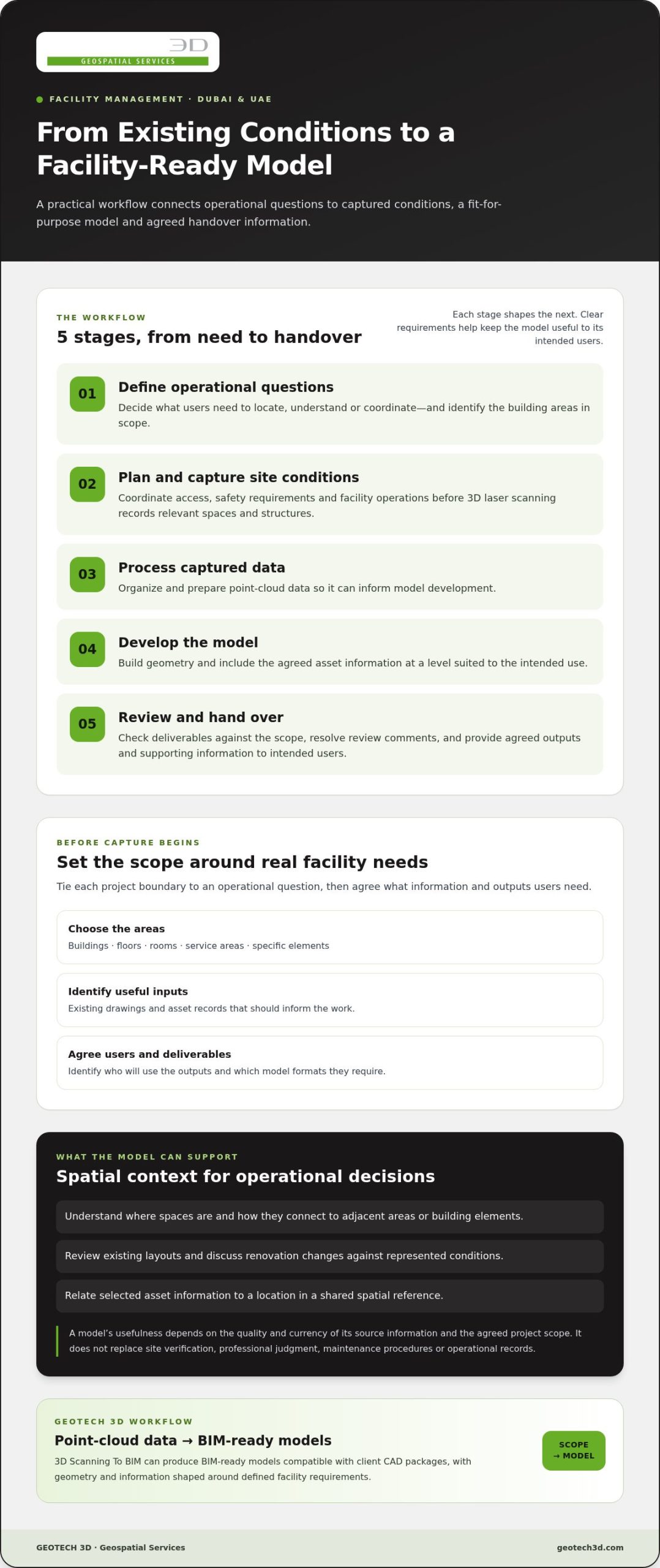
Captured conditions become a reviewed model through a planned sequence of scoping, scanning, processing, modeling, validation, and handover. A practical workflow can be organized as follows:
- Define the operational questions. Identify what users need to locate, understand, or coordinate, and which building areas are in scope.
- Plan and capture site conditions. Coordinate access, safety requirements, and facility operations before using 3D laser scanning to record relevant spaces and structures.
- Process the captured data. Organize and prepare the point-cloud data so it can inform model development.
- Develop the model. Build the geometry and include the agreed asset information at a level suited to the intended use.
- Review and hand over. Check the deliverables against the scope, resolve review comments, and provide the agreed outputs and supporting information to intended users.
What should teams define before capture begins?
Set clear boundaries for the work, such as buildings, floors, rooms, service areas, or specific elements. Connect each area to an operational question, such as where a space is located or how an existing condition relates to renovation planning. Identify existing drawings or asset records that should inform the work, the people who will use the outputs, and the model formats they require. Access, active operations, safety requirements, and coordination with facility teams also belong in the capture plan.
How does Scan-to-BIM support model creation?
3D laser scanning records existing conditions as spatial data. The resulting point cloud is a collection of measured points representing surfaces and visible features. It provides a basis for model development, but it is not itself a structured BIM model. In a Scan-to-BIM workflow, the captured data is processed and interpreted to develop model geometry and agreed information. The appropriate detail depends on the scope and intended use, rather than an assumed level of completeness.
GEOTECH 3D provides indoor, outdoor, and over-ceiling capture for documenting different parts of an existing facility. Review should check the model against the project scope and available source information, while recording exclusions or unresolved items for handover. A clear process from laser scans to BIM deliverables helps teams understand how captured conditions inform the finished model.
For projects in Dubai and across the UAE, GEOTECH 3D’s 3D Scanning To BIM services provide a route from point-cloud data to BIM-ready models compatible with client CAD packages. Defining the scope, information needs, and handover requirements early helps keep the workflow aligned with facility users’ needs.
Choosing the Right Model Scope for Facility Operations
The right model is the one that helps people perform defined tasks, not necessarily the one with the most geometry. Before setting the level of detail, list the decisions the facility team needs to support. Reviewing space allocation, coordinating a renovation, and locating asset records can call for different information and representations.
Use this comparison to frame the scope discussion. The approaches serve different purposes, and teams may use more than one depending on the workflow.
| Approach | Purpose and useful inputs | Limitations to consider |
|---|---|---|
| 2D records | Reviewing layouts, room labels, or documented locations. Useful inputs include current plans and schedules. | May be less intuitive for understanding vertical relationships or how elements connect across spaces. Records can also differ from existing conditions. |
| 3D model | Understanding spatial relationships and viewing selected building elements in context. Useful inputs include existing-condition capture, project drawings, and agreed asset information. | Its usefulness depends on what is modeled and what information is attached. A model does not automatically provide complete or current operational records. |
| Digital-twin approach | Organizing a broader digital representation where several data sources or spatial analysis are relevant. Inputs depend on the intended purpose and available data. | The term does not guarantee a particular level of detail, data connection, or update frequency. Define the intended scope rather than assuming specific capabilities. |
What level of model detail is useful?
Start with the decisions the model should support. Space review may depend on clear room boundaries and labels. Renovation coordination may need selected building elements represented in context. Asset-record access may call for agreed identifiers or attributes. More geometry is not automatically more useful. Define the spaces, elements, and information required, then agree the model scope and deliverables for the project.
When should a team consider a digital-twin approach?
Consider a broader digital representation when the purpose extends beyond viewing building geometry, such as bringing multiple data sources into a spatial-analysis context. The scope should state what information is included and how it will be used. GEOTECH 3D positions the Geoverse Platform for city-scale modeling, smart-city management, and spatial analysis. This describes its stated focus, not specific facility-system integrations or live operational feeds.
To make the scope practical, facility teams can agree on:
- The operational questions the model needs to support.
- The spaces and elements that need representation.
- The asset attributes users need to access alongside geometry.
- The intended deliverables and how users will refer to them.
This decision-led approach to 3D modeling for facility management helps keep visual detail aligned with operational value. GEOTECH 3D’s 3D Scanning To BIM services provide a route to structured model deliverables shaped around project requirements.
Planning Capture, Review, and Handover in Dubai and the UAE
A well-planned delivery connects facility objectives to site access, capture activities, review responsibilities, and final handover. For 3D modeling for facility management, coordination is especially important in occupied buildings, where work must be planned alongside normal operations. Treat access, safety, and operational constraints as project inputs, not assumptions about what can be achieved on site.
Before work begins, establish a practical plan that records:
- Objectives and boundaries: Identify intended uses, building areas, spaces, and elements included in the scope.
- Access and coordination: Map access zones, operating constraints, responsible contacts, and areas that require separate planning.
- Capture requirements: Decide which indoor, outdoor, or over-ceiling areas are relevant to the agreed purpose.
- Review and handover: Set out who will review the outputs, what they will check, and the required deliverables.
How can teams coordinate capture around active facilities?
Coordinate with the people responsible for facility access and operations before scheduling capture. Identify occupied or restricted areas, access routes, relevant work windows, and activities that could affect safe movement or site coordination. If the scope includes indoor, outdoor, or over-ceiling areas, consider each area’s access arrangements separately. This planning helps teams identify dependencies and constraints early, without assuming that every space will be available or operations can proceed unchanged.
Keep a record of agreed access arrangements and changes during the work. If a location cannot be captured as planned, document the area and its status so reviewers understand any resulting limitation. This is more useful than leaving an unrecorded gap that makes it appear the model represents every scoped condition.
What makes a model handover useful to operations teams?
Handover should reflect the needs established at project start. Specify the intended users, required file formats, model content, and how the outputs relate to existing records. If compatibility with a client CAD package is required, include it in the deliverable requirements. GEOTECH 3D’s point-cloud-to-BIM workflow provides BIM-ready models compatible with client CAD packages. The project requirements should define the relevant scope and deliverable format.
Review outputs against the agreed coverage, required information, and usability for the people who will receive them. Check that included areas are represented as intended, that labels or asset details needed by users are present, and that exclusions or unresolved items are clearly recorded. For renovation planning, these coordination considerations also apply when using 3D laser scanning to document existing conditions.
A model can become outdated as a facility changes. Define who is responsible for recording relevant changes, what information should be updated, and how revised model deliverables will be reviewed and issued. This creates a clear maintenance process for model information without assuming automatic updates.
How GEOTECH 3D Supports Facility-Management Modeling
Facility teams need more than a visual model. They need project outputs shaped around the building areas, operational questions, and information they intend to use. GEOTECH 3D supports this work through 3D Scanning To BIM and 3D Documentation, connecting existing site conditions with structured digital deliverables for projects in Dubai and across the UAE.
What GEOTECH 3D brings to the modeling workflow
3D laser scanning records the physical structure as spatial data, supporting accurate digital records of existing conditions. In a Scan-to-BIM workflow, captured point-cloud data informs the development of a BIM-ready model. The model scope can be aligned with agreed project requirements, so the geometry and information support intended facility uses rather than simply adding visual detail.
GEOTECH 3D provides indoor, outdoor, and over-ceiling data capture to document different parts of a building. Its end-to-end delivery extends from raw point-cloud data to BIM-ready models compatible with client CAD packages. For facility managers, asset owners, and project teams, this creates a defined path from site information to model outputs that can be reviewed against operational needs.
3D Documentation can also support structured records of existing buildings. The required coverage, level of detail, and associated information depend on the project scope. Agreeing these requirements with intended users helps keep deliverables relevant to facility operations, renovation planning, or asset-record review.
The Geoverse Platform has a distinct stated focus: city-scale modeling, smart-city management, and spatial analysis. It may be relevant where a project involves those broader spatial contexts. Its stated scope does not imply specific facility-system integrations, live sensor feeds, or automated maintenance functions.
What to prepare for a project discussion
A clear brief connects capture and modeling requirements to the facility team’s priorities. Before discussing a project, gather the information available and identify what intended users need from the deliverables. Useful details include:
- Facility areas: Buildings, floors, rooms, or specific indoor, outdoor, and over-ceiling zones to consider.
- Existing information: Available drawings, asset records, and other relevant building documentation.
- Operational questions: The decisions or coordination tasks the model should help inform.
- Users and outputs: Who will use the model, the desired deliverables, and any client CAD-package compatibility needs.
With these requirements established, GEOTECH 3D can discuss a project scope for 3D modeling for facility management that connects existing conditions with intended model use. Learn about GEOTECH 3D’s 3D Scanning To BIM services and how they can support your facility modeling requirements.
Turn Your Facility Information into a Practical Next Step
Start by identifying one operational question your team wants building information to help answer. That focus gives your facility model a clear purpose and helps shape decisions about scope, users, and how information will be maintained as the building changes. 3D modeling for facility management is most useful when it supports a defined workflow and remains aligned with the people who rely on it.
Bring together the facility areas in scope, available records, intended users, and the outputs your team needs. These details create a practical starting point for planning capture and model requirements with GEOTECH 3D.
Share your facility objectives, available information, and required deliverables with GEOTECH 3D to discuss a practical modeling scope for your Dubai or UAE project.
Frequently Asked Questions
What is 3D modeling for facility management?
3D modeling for facility management creates a digital view of a building that can be used alongside selected operational information. For example, if staff need to discuss how rooms relate to a shared corridor, the model can provide a common spatial reference for that conversation. Its usefulness depends on the content and purpose agreed for the project. It is not automatically a complete record of every building system or asset.
How does 3D laser scanning support facility management?
3D laser scanning captures spatial information from existing structures, which can help document conditions when drawings are missing, outdated, or difficult to interpret. Facility teams may use the resulting data to inform model creation or examine a space before planned work. A scan records visible conditions from the capture. It does not establish asset performance or replace the checks and records needed for operational decisions.
Is a 3D model the same as a digital twin?
No. A 3D model represents building geometry and may include selected asset information, while a digital twin is a broader digital representation shaped by its purpose and data. The label “digital twin” alone does not mean that a model receives live updates or controls equipment. For a facility project, clarify what information the representation contains, how it will be used, and what process will keep it current.
Can an existing building be modeled without complete drawings?
Yes. Existing-building conditions can be captured using 3D laser scanning, so complete drawings are not always the sole basis for developing a model. Available plans and asset records can still provide context and help identify information gaps. The project scope should state which areas are to be represented and how missing or uncertain information will be recorded, so users understand the model’s limits.
What information should a facility-management model contain?
Include information that supports the facility team’s defined tasks, rather than adding fields without a clear use. Depending on the project, useful content might include room identifiers, space names, asset references, or descriptions that help users interpret what they see. Agree on required fields with intended users and establish how information will be checked against available records before it is treated as operational reference data.
How do teams keep a facility model useful over time?
Set a process for recording changes that affect the model, such as a revised room layout or replaced equipment. Assign responsibility for submitting updates, identify which model information needs revision, and retain a clear record of when changes were reviewed. After significant building work, teams can assess whether updated capture or model revisions are needed. Without a defined update process, model information may no longer reflect current conditions.
Can Scan-to-BIM support renovation planning in Dubai?
Yes. Scan-to-BIM can provide a model based on captured existing conditions for teams planning renovation work in Dubai. Designers and project teams can use the spatial representation to review the current layout alongside proposed changes and coordinate discussion about affected areas. The model’s usefulness depends on its agreed scope and information. It does not replace site checks, design review, or project-specific coordination.
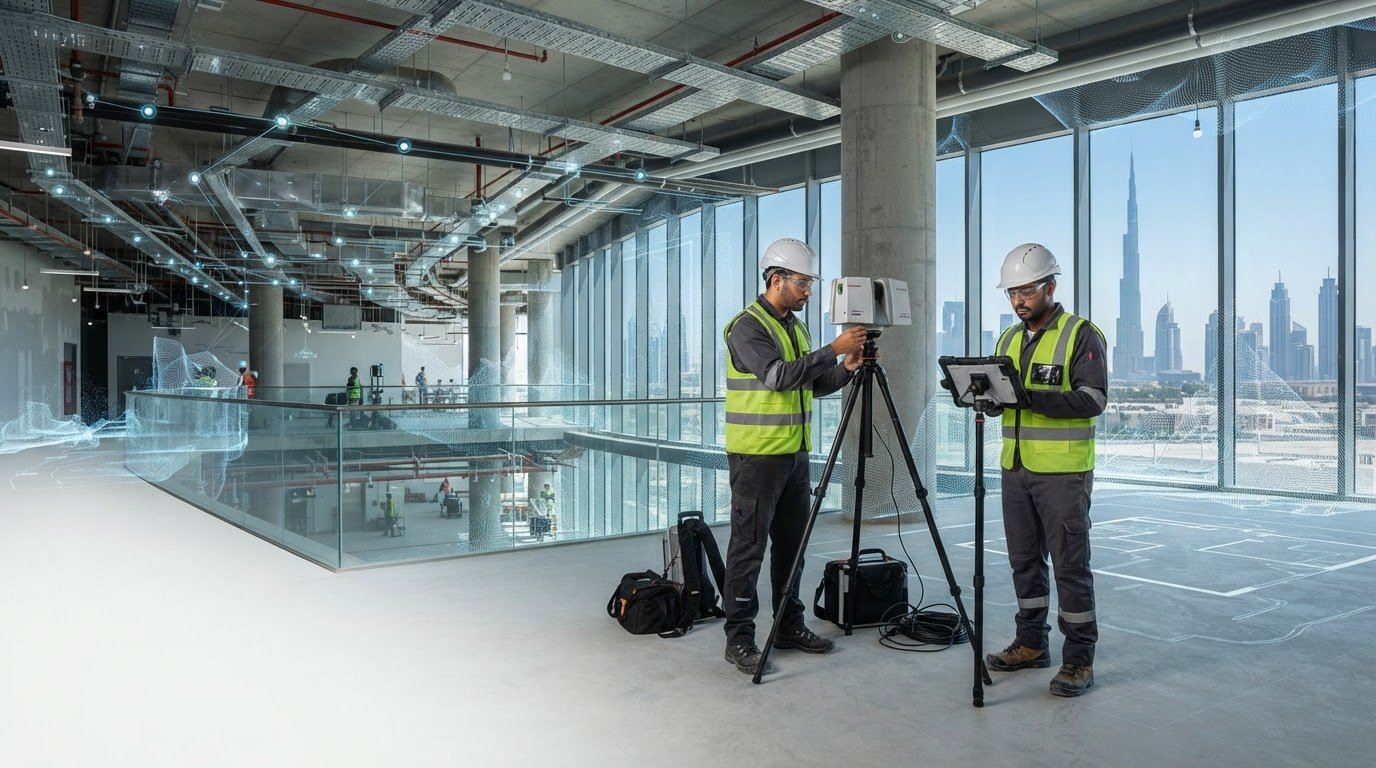
What if a facility model helped your team answer operational questions, not just view a building in 3D? That is the value of 3D modeling for facility management when geometry and asset information are scoped around real needs. Existing records can be incomplete or fragmented, and a model with unnecessary detail can be difficult to maintain or use.
It can be hard to know where to begin, especially when capture and modeling must be coordinated around an occupied facility. Start by defining what the team needs to locate, understand, or coordinate. Then shape the model and its information around those requirements.
This article explains how 3D models can support facility management, what information can make them useful, and how to plan a practical workflow in Dubai and across the UAE. It covers the route from 3D laser scanning and reality capture to 3D Scanning To BIM, including how to set a fit-for-purpose scope and plan capture around live operations. GEOTECH 3D provides a workflow from existing site conditions to BIM-ready models, helping teams work with a clearer digital view of an asset.
3D Modeling for Facility Management in Practice
A practical facility model begins with a defined use, such as understanding a space, coordinating renovation work, or relating asset information to its location. Those needs guide what to capture, which elements to model, and what information to include. In Dubai and across the UAE, planning those decisions early helps align site capture and model deliverables with facility operations.
Key Takeaways
- Use 3D modeling for facility management to connect building geometry with the asset information teams need for operational decisions.
- Start by defining facility workflows and questions, then plan capture, modeling, review, and handover around them.
- Choose between 2D records, a 3D model, or a digital-twin approach based on the information and spatial context required.
- Plan access and capture coordination carefully when documenting occupied facilities in Dubai and across the UAE.
- GEOTECH 3D’s 3D Scanning To BIM workflow can turn point-cloud data into BIM-ready models compatible with client CAD packages.
What 3D Modeling for Facility Management Can, and Cannot, Do
A facility-management model is a structured digital representation of a building that combines spatial geometry with relevant asset information. Unlike a photograph, it represents spaces and elements in three dimensions. Unlike a conventional drawing, it can show how those elements relate spatially and, where included in the project scope, associate them with information such as asset identifiers or descriptions.
This distinction matters when records are incomplete or difficult to interpret. A model can give facility teams a shared spatial reference for understanding existing conditions, locating areas, and discussing how building elements relate. Its usefulness depends on the quality and currency of its source information, as well as what the project includes. A model supports access to information, but it does not replace site verification, professional judgment, maintenance procedures, or operational records.
Building Information Modeling (BIM) provides a structured approach to representing built assets and their associated information across project stages. The Building Information Modeling (BIM) overview describes the broader concept. For facility operations, the practical question is how the model’s geometry and information serve the team’s defined purposes.
Which facility-management decisions can a 3D model support?
Spatial context helps teams understand where a space is and how it connects to adjacent areas or building elements. During renovation planning, for example, a model can help stakeholders review existing layouts and discuss proposed changes against represented conditions. When reviewing asset records, teams can use a shared view to relate an item’s information to its location instead of relying on a description alone.
This can support coordination between facility, design, and project teams by giving them a common reference for discussion. It does not determine whether work is appropriate or confirm that an asset is operational. Those decisions still depend on current records, inspections, procedures, and the relevant professionals’ judgment.
How is a 3D model different from a digital twin?
A 3D model represents building geometry and may include associated information. Its scope can range from a spatial representation to a structured model with selected asset details. A digital twin is a broader digital representation whose scope depends on its purpose and the data connected to it. The term alone does not establish what data it contains or how it is maintained.
Some digital-twin implementations may use ongoing data updates, but real-time feeds, automated alerts, or live controls should not be assumed. These depend on project-specific requirements and systems. GEOTECH 3D’s Geoverse Platform supports city-scale modeling, smart-city management, and spatial analysis. The intended use and information scope determine what a digital representation can practically support.
For facility teams in Dubai and across the UAE, a useful starting point is to distinguish the immediate need: a visual reference for spaces, a structured model with selected asset information, or a broader digital-twin approach. Defining that purpose helps keep expectations clear and the model scope aligned with operational needs.
How Existing-Building Data Becomes a Facility-Management Model
A useful model starts with a clear operational purpose, not with capture alone. For 3D modeling for facility management, teams need a traceable route from the questions they want to answer to the information they receive at handover. Each stage shapes the next: unclear requirements can lead to data or model content that does not serve the intended users.
Captured conditions become a reviewed model through a planned sequence of scoping, scanning, processing, modeling, validation, and handover. A practical workflow can be organized as follows:
- Define the operational questions. Identify what users need to locate, understand, or coordinate, and which building areas are in scope.
- Plan and capture site conditions. Coordinate access, safety requirements, and facility operations before using 3D laser scanning to record relevant spaces and structures.
- Process the captured data. Organize and prepare the point-cloud data so it can inform model development.
- Develop the model. Build the geometry and include the agreed asset information at a level suited to the intended use.
- Review and hand over. Check the deliverables against the scope, resolve review comments, and provide the agreed outputs and supporting information to intended users.
What should teams define before capture begins?
Set clear boundaries for the work, such as buildings, floors, rooms, service areas, or specific elements. Connect each area to an operational question, such as where a space is located or how an existing condition relates to renovation planning. Identify existing drawings or asset records that should inform the work, the people who will use the outputs, and the model formats they require. Access, active operations, safety requirements, and coordination with facility teams also belong in the capture plan.
How does Scan-to-BIM support model creation?
3D laser scanning records existing conditions as spatial data. The resulting point cloud is a collection of measured points representing surfaces and visible features. It provides a basis for model development, but it is not itself a structured BIM model. In a Scan-to-BIM workflow, the captured data is processed and interpreted to develop model geometry and agreed information. The appropriate detail depends on the scope and intended use, rather than an assumed level of completeness.
GEOTECH 3D provides indoor, outdoor, and over-ceiling capture for documenting different parts of an existing facility. Review should check the model against the project scope and available source information, while recording exclusions or unresolved items for handover. A clear process from laser scans to BIM deliverables helps teams understand how captured conditions inform the finished model.
For projects in Dubai and across the UAE, GEOTECH 3D’s 3D Scanning To BIM services provide a route from point-cloud data to BIM-ready models compatible with client CAD packages. Defining the scope, information needs, and handover requirements early helps keep the workflow aligned with facility users’ needs.
Choosing the Right Model Scope for Facility Operations
The right model is the one that helps people perform defined tasks, not necessarily the one with the most geometry. Before setting the level of detail, list the decisions the facility team needs to support. Reviewing space allocation, coordinating a renovation, and locating asset records can call for different information and representations.
Use this comparison to frame the scope discussion. The approaches serve different purposes, and teams may use more than one depending on the workflow.
| Approach | Purpose and useful inputs | Limitations to consider |
|---|---|---|
| 2D records | Reviewing layouts, room labels, or documented locations. Useful inputs include current plans and schedules. | May be less intuitive for understanding vertical relationships or how elements connect across spaces. Records can also differ from existing conditions. |
| 3D model | Understanding spatial relationships and viewing selected building elements in context. Useful inputs include existing-condition capture, project drawings, and agreed asset information. | Its usefulness depends on what is modeled and what information is attached. A model does not automatically provide complete or current operational records. |
| Digital-twin approach | Organizing a broader digital representation where several data sources or spatial analysis are relevant. Inputs depend on the intended purpose and available data. | The term does not guarantee a particular level of detail, data connection, or update frequency. Define the intended scope rather than assuming specific capabilities. |
What level of model detail is useful?
Start with the decisions the model should support. Space review may depend on clear room boundaries and labels. Renovation coordination may need selected building elements represented in context. Asset-record access may call for agreed identifiers or attributes. More geometry is not automatically more useful. Define the spaces, elements, and information required, then agree the model scope and deliverables for the project.
When should a team consider a digital-twin approach?
Consider a broader digital representation when the purpose extends beyond viewing building geometry, such as bringing multiple data sources into a spatial-analysis context. The scope should state what information is included and how it will be used. GEOTECH 3D positions the Geoverse Platform for city-scale modeling, smart-city management, and spatial analysis. This describes its stated focus, not specific facility-system integrations or live operational feeds.
To make the scope practical, facility teams can agree on:
- The operational questions the model needs to support.
- The spaces and elements that need representation.
- The asset attributes users need to access alongside geometry.
- The intended deliverables and how users will refer to them.
This decision-led approach to 3D modeling for facility management helps keep visual detail aligned with operational value. GEOTECH 3D’s 3D Scanning To BIM services provide a route to structured model deliverables shaped around project requirements.
Planning Capture, Review, and Handover in Dubai and the UAE
A well-planned delivery connects facility objectives to site access, capture activities, review responsibilities, and final handover. For 3D modeling for facility management, coordination is especially important in occupied buildings, where work must be planned alongside normal operations. Treat access, safety, and operational constraints as project inputs, not assumptions about what can be achieved on site.
Before work begins, establish a practical plan that records:
- Objectives and boundaries: Identify intended uses, building areas, spaces, and elements included in the scope.
- Access and coordination: Map access zones, operating constraints, responsible contacts, and areas that require separate planning.
- Capture requirements: Decide which indoor, outdoor, or over-ceiling areas are relevant to the agreed purpose.
- Review and handover: Set out who will review the outputs, what they will check, and the required deliverables.
How can teams coordinate capture around active facilities?
Coordinate with the people responsible for facility access and operations before scheduling capture. Identify occupied or restricted areas, access routes, relevant work windows, and activities that could affect safe movement or site coordination. If the scope includes indoor, outdoor, or over-ceiling areas, consider each area’s access arrangements separately. This planning helps teams identify dependencies and constraints early, without assuming that every space will be available or operations can proceed unchanged.
Keep a record of agreed access arrangements and changes during the work. If a location cannot be captured as planned, document the area and its status so reviewers understand any resulting limitation. This is more useful than leaving an unrecorded gap that makes it appear the model represents every scoped condition.
What makes a model handover useful to operations teams?
Handover should reflect the needs established at project start. Specify the intended users, required file formats, model content, and how the outputs relate to existing records. If compatibility with a client CAD package is required, include it in the deliverable requirements. GEOTECH 3D’s point-cloud-to-BIM workflow provides BIM-ready models compatible with client CAD packages. The project requirements should define the relevant scope and deliverable format.
Review outputs against the agreed coverage, required information, and usability for the people who will receive them. Check that included areas are represented as intended, that labels or asset details needed by users are present, and that exclusions or unresolved items are clearly recorded. For renovation planning, these coordination considerations also apply when using 3D laser scanning to document existing conditions.
A model can become outdated as a facility changes. Define who is responsible for recording relevant changes, what information should be updated, and how revised model deliverables will be reviewed and issued. This creates a clear maintenance process for model information without assuming automatic updates.
How GEOTECH 3D Supports Facility-Management Modeling
Facility teams need more than a visual model. They need project outputs shaped around the building areas, operational questions, and information they intend to use. GEOTECH 3D supports this work through 3D Scanning To BIM and 3D Documentation, connecting existing site conditions with structured digital deliverables for projects in Dubai and across the UAE.
What GEOTECH 3D brings to the modeling workflow
3D laser scanning records the physical structure as spatial data, supporting accurate digital records of existing conditions. In a Scan-to-BIM workflow, captured point-cloud data informs the development of a BIM-ready model. The model scope can be aligned with agreed project requirements, so the geometry and information support intended facility uses rather than simply adding visual detail.
GEOTECH 3D provides indoor, outdoor, and over-ceiling data capture to document different parts of a building. Its end-to-end delivery extends from raw point-cloud data to BIM-ready models compatible with client CAD packages. For facility managers, asset owners, and project teams, this creates a defined path from site information to model outputs that can be reviewed against operational needs.
3D Documentation can also support structured records of existing buildings. The required coverage, level of detail, and associated information depend on the project scope. Agreeing these requirements with intended users helps keep deliverables relevant to facility operations, renovation planning, or asset-record review.
The Geoverse Platform has a distinct stated focus: city-scale modeling, smart-city management, and spatial analysis. It may be relevant where a project involves those broader spatial contexts. Its stated scope does not imply specific facility-system integrations, live sensor feeds, or automated maintenance functions.
What to prepare for a project discussion
A clear brief connects capture and modeling requirements to the facility team’s priorities. Before discussing a project, gather the information available and identify what intended users need from the deliverables. Useful details include:
- Facility areas: Buildings, floors, rooms, or specific indoor, outdoor, and over-ceiling zones to consider.
- Existing information: Available drawings, asset records, and other relevant building documentation.
- Operational questions: The decisions or coordination tasks the model should help inform.
- Users and outputs: Who will use the model, the desired deliverables, and any client CAD-package compatibility needs.
With these requirements established, GEOTECH 3D can discuss a project scope for 3D modeling for facility management that connects existing conditions with intended model use. Learn about GEOTECH 3D’s 3D Scanning To BIM services and how they can support your facility modeling requirements.
Turn Your Facility Information into a Practical Next Step
Start by identifying one operational question your team wants building information to help answer. That focus gives your facility model a clear purpose and helps shape decisions about scope, users, and how information will be maintained as the building changes. 3D modeling for facility management is most useful when it supports a defined workflow and remains aligned with the people who rely on it.
Bring together the facility areas in scope, available records, intended users, and the outputs your team needs. These details create a practical starting point for planning capture and model requirements with GEOTECH 3D.
Share your facility objectives, available information, and required deliverables with GEOTECH 3D to discuss a practical modeling scope for your Dubai or UAE project.
Frequently Asked Questions
What is 3D modeling for facility management?
3D modeling for facility management creates a digital view of a building that can be used alongside selected operational information. For example, if staff need to discuss how rooms relate to a shared corridor, the model can provide a common spatial reference for that conversation. Its usefulness depends on the content and purpose agreed for the project. It is not automatically a complete record of every building system or asset.
How does 3D laser scanning support facility management?
3D laser scanning captures spatial information from existing structures, which can help document conditions when drawings are missing, outdated, or difficult to interpret. Facility teams may use the resulting data to inform model creation or examine a space before planned work. A scan records visible conditions from the capture. It does not establish asset performance or replace the checks and records needed for operational decisions.
Is a 3D model the same as a digital twin?
No. A 3D model represents building geometry and may include selected asset information, while a digital twin is a broader digital representation shaped by its purpose and data. The label “digital twin” alone does not mean that a model receives live updates or controls equipment. For a facility project, clarify what information the representation contains, how it will be used, and what process will keep it current.
Can an existing building be modeled without complete drawings?
Yes. Existing-building conditions can be captured using 3D laser scanning, so complete drawings are not always the sole basis for developing a model. Available plans and asset records can still provide context and help identify information gaps. The project scope should state which areas are to be represented and how missing or uncertain information will be recorded, so users understand the model’s limits.
What information should a facility-management model contain?
Include information that supports the facility team’s defined tasks, rather than adding fields without a clear use. Depending on the project, useful content might include room identifiers, space names, asset references, or descriptions that help users interpret what they see. Agree on required fields with intended users and establish how information will be checked against available records before it is treated as operational reference data.
How do teams keep a facility model useful over time?
Set a process for recording changes that affect the model, such as a revised room layout or replaced equipment. Assign responsibility for submitting updates, identify which model information needs revision, and retain a clear record of when changes were reviewed. After significant building work, teams can assess whether updated capture or model revisions are needed. Without a defined update process, model information may no longer reflect current conditions.
Can Scan-to-BIM support renovation planning in Dubai?
Yes. Scan-to-BIM can provide a model based on captured existing conditions for teams planning renovation work in Dubai. Designers and project teams can use the spatial representation to review the current layout alongside proposed changes and coordinate discussion about affected areas. The model’s usefulness depends on its agreed scope and information. It does not replace site checks, design review, or project-specific coordination.
Search Now
Error: Contact form not found.