

Our Services
Scan to CAD Services: Point Cloud to Usable CAD
An accurate scan is only the starting point. The value comes from converting point-cloud data into CAD information that supports a specific project decision. When existing drawings are incomplete or outdated, scan to CAD conversion services can document current conditions, but the usefulness of the result depends on what the model needs to show and how the team will use it.
For a facility, construction, architecture, engineering or real-estate project in Dubai or elsewhere in the UAE, defining that purpose early helps align the captured data with a practical deliverable. GEOTECH 3D provides Scan To CAD as part of its 3D Scanning services, with a process from raw point-cloud data to models compatible with client CAD packages.
This guide covers the stages from 3D capture to CAD-ready output, the factors that shape the resulting model, and how to set clear expectations for modelling detail, inputs and delivery. It also explains how to scope a project around its intended use, so the handover is clear and the CAD output supports the work ahead.
Key Takeaways
- Define the project decision your CAD model needs to support before setting its modelling scope.
- Understand how scan to CAD conversion services turn captured site conditions into CAD-compatible project information.
- Follow the workflow from capture planning and point-cloud processing through modelling, review and delivery.
- Choose between CAD and BIM based on the intended use and the information the project needs to carry.
- Prepare a clear brief for your Dubai or UAE site, including available drawings, project boundaries, stakeholders and intended CAD use.
What Are Scan to CAD Services and Their Deliverables?
Scan-to-CAD converts information about a physical site or asset into digital documentation for a defined project use. The brief determines what the output should represent: selected building geometry for a renovation, visible equipment and pipework for facility planning, or existing conditions for design coordination. Defining the required content helps focus modelling on information the project team will use.
A point cloud records measured spatial data; a CAD model interprets selected parts of that data as structured, project-usable geometry. The two are related, but they are not interchangeable. Laser scanning captures existing conditions. Scan to CAD conversion services involve interpreting relevant geometry and representing it in CAD-compatible documentation. The scan does not automatically become a finished drawing.
A digital record of existing conditions can give designers, engineers, contractors and asset owners a shared reference when drawings are incomplete or outdated. It can support design decisions, coordination and facility planning by helping teams work from captured conditions rather than relying only on assumptions. The appropriate deliverable depends on the decisions it needs to support.
What information does a scan-to-CAD project begin with?
Laser scanning captures physical conditions as point-cloud data, a set of spatial measurements representing visible surfaces and features from the scan positions. The broader process of 3D scanning creates digital representations of real-world objects or environments. Capture planning can include indoor, outdoor and over-ceiling areas, according to the agreed scope and site access. Prioritize the spaces and assets that matter to the intended CAD use.
How is a CAD model different from a point cloud?
A point cloud is the captured spatial dataset, not finished CAD documentation. It records existing surfaces, but does not define which features should become model elements or how those elements should serve the project. CAD conversion interprets relevant geometry and represents it in a form that supports the agreed purpose. Model content and detail depend on the project brief.
Before work begins, identify:
- The decision or task: such as design development, coordination, refurbishment planning or asset documentation.
- The areas and features to represent: including relevant rooms, structural elements, equipment or visible services.
- The intended users: such as architects, engineers, contractors or facility teams.
- The CAD requirements: the receiving team’s software needs, preferred output and review expectations.
These points distinguish essential geometry from information outside the model’s purpose. They also give the team a practical basis for reviewing whether the CAD output meets the agreed scope, without assuming a particular file format, modelling detail or tolerance.
Scan to CAD Workflow: From Site Capture to Model
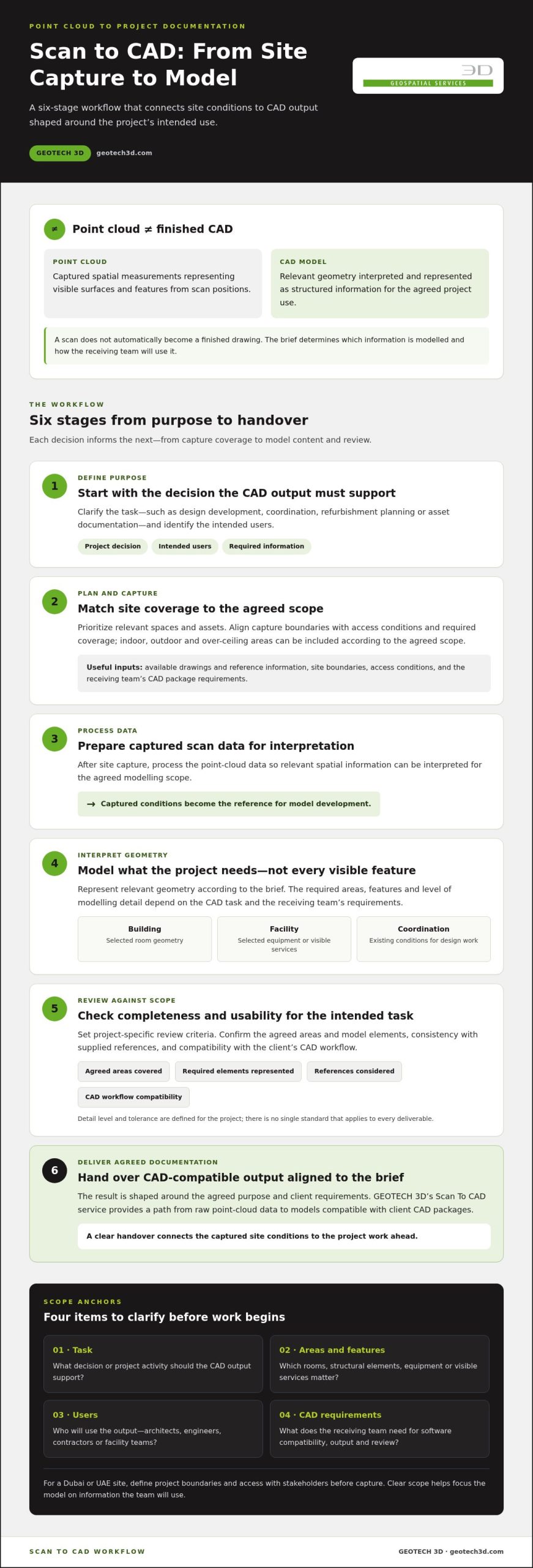
A useful scan-to-CAD workflow connects the project’s purpose to the final CAD requirements at every stage. The sequence is to define the intended use, plan and capture site conditions, process the scan data, interpret relevant geometry as model elements, review the output against scope, and deliver the agreed documentation. Each stage informs the next, so decisions made before capture affect what the model can represent.
From physical capture to CAD-compatible documentation, the workflow moves through planning, scanning, data processing, interpretation, review and delivery. Captured data does not become a finished drawing automatically. For scan to CAD conversion services, decisions about coverage and model use guide how the information is processed and represented.
Planning capture around the project’s CAD requirements
Start by identifying the decisions the model or drawings need to support. A refurbishment team may need existing room geometry, while a facility team may need selected equipment or visible services documented for planning. The capture plan should account for relevant spaces and assets, access conditions, required coverage, available reference information and the receiving team’s CAD package requirements.
Before site work, align stakeholders on the capture boundaries and intended use of the output. For a Dubai facility, identify which areas are in scope and where access is possible rather than assuming every part of the site can be captured. Existing drawings and other reference information help frame the work and clarify how the resulting model will be used.
From point-cloud interpretation to CAD review
After capture, scan data is processed for interpretation. The modelling stage represents relevant geometry according to the agreed scope, rather than modelling every visible feature by default. Decide what to include based on the CAD task and the receiving team’s requirements. GEOTECH 3D’s Scan To CAD service provides an end-to-end path from raw point-cloud data to models compatible with client CAD packages.
A structured review checks whether the output is complete and usable for its intended purpose. Review the agreed areas, required model elements, consistency with supplied references and compatibility with the client’s CAD workflow. Set review criteria for the project; there is no single detail level or tolerance that applies to every deliverable.
- Define purpose: identify the decisions and tasks the CAD output must support.
- Plan and capture: align coverage with relevant spaces, assets and access conditions.
- Process data: prepare the captured information for interpretation.
- Model: represent the relevant geometry within the agreed scope.
- Review and deliver: assess completeness and usability against requirements, then provide the agreed output.
Coordination between capture scope, modelling decisions and CAD requirements helps keep the deliverable aligned with the project. To discuss a Dubai or UAE project’s capture-to-model requirements, explore GEOTECH 3D’s scanning services.
Scan to CAD vs. Scan to BIM: Choosing the Right Output
The right deliverable depends on what the project team needs to do with the model. CAD and BIM can both be developed from laser-scan information, but they serve different purposes. CAD may suit geometric documentation and design reference, while BIM is a distinct modelling approach for workflows that require structured building information. Neither is automatically the better option. Let the intended use and deliverable requirements guide the choice.
Before commissioning scan to CAD conversion services, define how the output will be used after delivery. Will the team refer to existing geometry while preparing a design, or does the workflow depend on building elements carrying structured information? Clarifying this distinction helps match the modelling scope to the needs of the architects, engineers, contractors or asset teams who will use the result.
When CAD documentation is the more suitable deliverable
CAD documentation can suit projects where the main need is geometric reference, such as recording selected existing conditions for design development, renovation planning or asset reference. A design team, for example, may need relevant room geometry or visible structural features for coordination. Specify which drawings, areas and elements are required rather than assuming every project needs a building-information-rich model.
Consider the tasks the drawings must support. A team coordinating a refurbishment may prioritize existing geometry in affected areas; a facility team may need specific features documented for reference. The model should reflect those tasks and the receiving team’s CAD workflow. For renovation projects, capture planning and the scope of existing-condition information are also central considerations. See the 3D laser scanning for renovation guide for related context.
When a Scan-to-BIM workflow may fit better
BIM is not simply another name for CAD. It is appropriate when the project requires a model organized around building information as well as geometry. This distinction matters when multiple project participants rely on structured elements and information in a coordinated building-modelling workflow. State what information the model must contain and how it will be used, so the modelling approach matches the required deliverable.
For projects in Dubai or elsewhere in the UAE, align the intended output with the project team’s submission, coordination and asset-information needs. The scan itself does not determine whether CAD or BIM is suitable; the required model purpose and information structure do. If a BIM deliverable is being considered, explore BIM modeling from laser scans for a closer look at that workflow.
Use these questions to compare the options:
- Is the main need geometric reference? CAD may be appropriate when the team needs defined existing conditions for design, renovation or asset reference.
- Does the workflow require structured building information? Consider BIM when the project needs more than geometry alone.
- Who will use the model, and for what task? Confirm that the scope and information content match the receiving team’s work.
Settle these requirements before modelling begins. A clearly defined purpose gives the project team a sound basis for selecting the output and reviewing it against the agreed scope.
How to Scope a Scan to CAD Project for a Dubai or UAE Site
A clear project brief connects site capture to the CAD information the team needs. Before arranging scan to CAD conversion services, define the facility or area, the decisions the model should support and how the receiving team will use the output. These details give the capture and modelling work a practical boundary.
Scope clarity connects capture effort to useful CAD outputs. It helps teams align on coverage, access, reference information and review responsibilities before modelling begins, reducing the risk of mismatched expectations at handover.
What to define before site capture begins
Describe the site and the intended use of the deliverable. A renovation team, for example, may need information for a defined work area, while an asset owner may need selected facility features documented for planning. Identify relevant spaces and assets, capture conditions, access arrangements, site safety requirements and schedule coordination needs. These inputs help shape a practical capture plan for a Dubai or UAE site.
Gather existing drawings and reference information that provide project context. Then build the brief around these items:
- Site and boundaries: name the facility, buildings, floors or areas included, and identify exclusions.
- Purpose: state the decisions, design tasks or coordination work the CAD deliverable should support.
- Coverage: identify the spaces, assets and visible features that need to be captured and represented.
- Project inputs: share available drawings, reference data and relevant information about the site.
- People and logistics: identify site contacts, stakeholders, access conditions, safety requirements and schedule constraints.
- CAD use: describe the receiving team’s intended workflow and requirements for using the output.
Involve the client, design and engineering teams early to clarify which details are essential and where the model will be used. This alignment is particularly useful for facilities with multiple stakeholders or work areas, where priorities may differ across teams.
How teams can review the CAD deliverable
Set review responsibilities before modelling starts. Identify who will review coverage, who will assess whether the model content supports the intended task, and who will consolidate comments. Agree acceptance criteria against the brief, including the areas and elements to include, usability for the stated CAD purpose and how revisions will be recorded.
During review, compare the deliverable with the agreed scope rather than an assumed universal standard. Check that the specified spaces and features are represented, note omissions or questions against the relevant requirement, and route comments through a designated project contact. A clear revision record distinguishes requested changes from items outside the original scope and supports consistent communication across client, engineering, design and project teams.
With the brief, access planning and review process aligned, GEOTECH 3D can tailor its Scan To CAD scope to the project site and intended use.
GEOTECH 3D Scan to CAD in Dubai: Capture to CAD Models
GEOTECH 3D provides Scan To CAD as part of its 3D Scanning services for project teams that need to turn captured existing conditions into CAD-compatible information. The service covers an end-to-end path from raw point-cloud data to models compatible with client CAD packages. For developers, consultants, engineers and asset owners in Dubai and across the UAE, the scope is shaped around the site and intended use of the model.
A project-led approach matters because a model for architectural design coordination may need different content from one used to reference an industrial facility. Defining the purpose early connects capture planning and modelling decisions to the project team’s requirements, rather than treating scan to CAD conversion services as a generic file-conversion task.
A project-led approach to 3D Scanning
Project purpose informs what is captured and how relevant geometry is represented. GEOTECH 3D uses laser-scanning technology to create digital records and develops 3D models of oil and gas facilities and brownfields. For each project, the required areas, assets and intended CAD use guide the scope. A clear brief helps teams focus on useful documentation while coordinating site access and safety considerations.
Applications can span architecture, engineering, construction, real estate and facility planning. Teams may need existing-condition information to inform design work, coordinate project decisions or document relevant asset geometry. The required model content should follow those needs; one level of detail or output specification does not suit every site. GEOTECH 3D’s geospatial services connect scanning and CAD deliverables with wider project information requirements.
Discuss your Dubai or UAE scan-to-CAD requirements
To establish a practical scope, share the site context, the decisions the model should support, the relevant areas and assets, and any available drawings or reference information. Include the intended CAD use and the receiving team’s CAD package requirements. These details align capture planning with modelling expectations and give project stakeholders a common basis for review.
GEOTECH 3D works with project teams to define a Scan To CAD approach suited to the facility and its objectives. Clear communication about the site, access, safety considerations and deliverable expectations supports a coordinated process from capture through model delivery. This is particularly relevant where facility conditions and project requirements need to be considered together, as in construction, engineering or brownfield environments.
For a Dubai or UAE project, bring the site information and intended use together at the outset. A defined scope helps establish what the captured data should support and what the CAD model needs to represent.
Turn Your Site Data Into a Clear Next Step
A scan-to-CAD project can do more than document a facility. With a defined purpose, the resulting information can become a practical reference for design decisions, coordination and asset planning. Treat the brief as a shared project tool: it aligns the people commissioning the work with the teams who will use the model.
Before moving forward, identify the decision the deliverable should support and who needs to rely on it. That gives scan to CAD conversion services a clear direction, connecting the project’s existing conditions to its next phase of work. A focused conversation about the site, intended use and project requirements is a practical place to begin.
With the scope defined, your team has a clearer basis for moving from captured site conditions to CAD documentation for the work ahead.
Frequently Asked Questions
What is scan to CAD conversion?
Scan to CAD conversion turns information captured from a physical site or asset into CAD documentation for a defined project use. A Dubai design team, for example, might need existing building geometry as a reference for planned alterations. The model’s content depends on the project brief, including which areas and features matter and how the receiving team will use the documentation. GEOTECH 3D provides Scan To CAD within its 3D Scanning services.
How does a point cloud become a CAD model?
A point cloud becomes a CAD model through interpretation and modelling, not by treating the scan as a finished drawing. The captured data is processed, then relevant geometry is represented according to the agreed scope and intended use. A team may specify particular structural or architectural features for coordination. Review criteria help assess whether the model includes the requested content and suits its planned role.
Can scan to CAD use existing point-cloud data?
Existing point-cloud data can be used as an input when it contains suitable information for the required CAD work. Provide the data with its site context, available reference material and intended use. These details help relate the captured geometry to the requested model scope, especially when the scan was collected previously or by another project team.
What information should I provide for a scan-to-CAD project?
Provide the site location and boundaries, project purpose, areas and assets of interest, and any relevant drawings or reference information. Include site access and safety considerations, schedule coordination needs, the receiving team’s CAD package requirements, and the people responsible for review. For a facility in the UAE, note operational constraints or areas that cannot be accessed so the capture plan reflects actual site conditions.
How do scan to CAD and scan to BIM differ?
Scan to CAD typically produces geometric documentation for tasks such as design reference or existing-condition coordination. Scan to BIM is intended for workflows that require a model structured around building information as well as geometry. The right output depends on what the project team needs to use and manage. If the model must support information-rich building workflows, define those requirements in the brief rather than assuming a CAD model will meet them.
Can 3D laser scanning capture indoor, outdoor, and over-ceiling areas?
GEOTECH 3D’s 3D scanning capabilities include indoor, outdoor and over-ceiling capture. The areas included in a project depend on its agreed scope and site access. Identify the spaces and features that matter, along with access arrangements, before capture planning. This helps clarify which conditions are in scope and align the resulting CAD documentation with its intended use.
How is a scan-to-CAD deliverable reviewed against project requirements?
Review the deliverable against the project brief, not an assumed universal level of detail or tolerance. Assign reviewers from the relevant client, design, engineering or project teams, then check whether the agreed areas and model content are represented and usable for the stated task. Consolidate comments through a designated review process and record revisions clearly. This gives the team a practical basis for resolving questions and assessing the handover.

An accurate scan is only the starting point. The value comes from converting point-cloud data into CAD information that supports a specific project decision. When existing drawings are incomplete or outdated, scan to CAD conversion services can document current conditions, but the usefulness of the result depends on what the model needs to show and how the team will use it.
For a facility, construction, architecture, engineering or real-estate project in Dubai or elsewhere in the UAE, defining that purpose early helps align the captured data with a practical deliverable. GEOTECH 3D provides Scan To CAD as part of its 3D Scanning services, with a process from raw point-cloud data to models compatible with client CAD packages.
This guide covers the stages from 3D capture to CAD-ready output, the factors that shape the resulting model, and how to set clear expectations for modelling detail, inputs and delivery. It also explains how to scope a project around its intended use, so the handover is clear and the CAD output supports the work ahead.
Key Takeaways
- Define the project decision your CAD model needs to support before setting its modelling scope.
- Understand how scan to CAD conversion services turn captured site conditions into CAD-compatible project information.
- Follow the workflow from capture planning and point-cloud processing through modelling, review and delivery.
- Choose between CAD and BIM based on the intended use and the information the project needs to carry.
- Prepare a clear brief for your Dubai or UAE site, including available drawings, project boundaries, stakeholders and intended CAD use.
What Are Scan to CAD Services and Their Deliverables?
Scan-to-CAD converts information about a physical site or asset into digital documentation for a defined project use. The brief determines what the output should represent: selected building geometry for a renovation, visible equipment and pipework for facility planning, or existing conditions for design coordination. Defining the required content helps focus modelling on information the project team will use.
A point cloud records measured spatial data; a CAD model interprets selected parts of that data as structured, project-usable geometry. The two are related, but they are not interchangeable. Laser scanning captures existing conditions. Scan to CAD conversion services involve interpreting relevant geometry and representing it in CAD-compatible documentation. The scan does not automatically become a finished drawing.
A digital record of existing conditions can give designers, engineers, contractors and asset owners a shared reference when drawings are incomplete or outdated. It can support design decisions, coordination and facility planning by helping teams work from captured conditions rather than relying only on assumptions. The appropriate deliverable depends on the decisions it needs to support.
What information does a scan-to-CAD project begin with?
Laser scanning captures physical conditions as point-cloud data, a set of spatial measurements representing visible surfaces and features from the scan positions. The broader process of 3D scanning creates digital representations of real-world objects or environments. Capture planning can include indoor, outdoor and over-ceiling areas, according to the agreed scope and site access. Prioritize the spaces and assets that matter to the intended CAD use.
How is a CAD model different from a point cloud?
A point cloud is the captured spatial dataset, not finished CAD documentation. It records existing surfaces, but does not define which features should become model elements or how those elements should serve the project. CAD conversion interprets relevant geometry and represents it in a form that supports the agreed purpose. Model content and detail depend on the project brief.
Before work begins, identify:
- The decision or task: such as design development, coordination, refurbishment planning or asset documentation.
- The areas and features to represent: including relevant rooms, structural elements, equipment or visible services.
- The intended users: such as architects, engineers, contractors or facility teams.
- The CAD requirements: the receiving team’s software needs, preferred output and review expectations.
These points distinguish essential geometry from information outside the model’s purpose. They also give the team a practical basis for reviewing whether the CAD output meets the agreed scope, without assuming a particular file format, modelling detail or tolerance.
Scan to CAD Workflow: From Site Capture to Model
A useful scan-to-CAD workflow connects the project’s purpose to the final CAD requirements at every stage. The sequence is to define the intended use, plan and capture site conditions, process the scan data, interpret relevant geometry as model elements, review the output against scope, and deliver the agreed documentation. Each stage informs the next, so decisions made before capture affect what the model can represent.
From physical capture to CAD-compatible documentation, the workflow moves through planning, scanning, data processing, interpretation, review and delivery. Captured data does not become a finished drawing automatically. For scan to CAD conversion services, decisions about coverage and model use guide how the information is processed and represented.
Planning capture around the project’s CAD requirements
Start by identifying the decisions the model or drawings need to support. A refurbishment team may need existing room geometry, while a facility team may need selected equipment or visible services documented for planning. The capture plan should account for relevant spaces and assets, access conditions, required coverage, available reference information and the receiving team’s CAD package requirements.
Before site work, align stakeholders on the capture boundaries and intended use of the output. For a Dubai facility, identify which areas are in scope and where access is possible rather than assuming every part of the site can be captured. Existing drawings and other reference information help frame the work and clarify how the resulting model will be used.
From point-cloud interpretation to CAD review
After capture, scan data is processed for interpretation. The modelling stage represents relevant geometry according to the agreed scope, rather than modelling every visible feature by default. Decide what to include based on the CAD task and the receiving team’s requirements. GEOTECH 3D’s Scan To CAD service provides an end-to-end path from raw point-cloud data to models compatible with client CAD packages.
A structured review checks whether the output is complete and usable for its intended purpose. Review the agreed areas, required model elements, consistency with supplied references and compatibility with the client’s CAD workflow. Set review criteria for the project; there is no single detail level or tolerance that applies to every deliverable.
- Define purpose: identify the decisions and tasks the CAD output must support.
- Plan and capture: align coverage with relevant spaces, assets and access conditions.
- Process data: prepare the captured information for interpretation.
- Model: represent the relevant geometry within the agreed scope.
- Review and deliver: assess completeness and usability against requirements, then provide the agreed output.
Coordination between capture scope, modelling decisions and CAD requirements helps keep the deliverable aligned with the project. To discuss a Dubai or UAE project’s capture-to-model requirements, explore GEOTECH 3D’s scanning services.
Scan to CAD vs. Scan to BIM: Choosing the Right Output
The right deliverable depends on what the project team needs to do with the model. CAD and BIM can both be developed from laser-scan information, but they serve different purposes. CAD may suit geometric documentation and design reference, while BIM is a distinct modelling approach for workflows that require structured building information. Neither is automatically the better option. Let the intended use and deliverable requirements guide the choice.
Before commissioning scan to CAD conversion services, define how the output will be used after delivery. Will the team refer to existing geometry while preparing a design, or does the workflow depend on building elements carrying structured information? Clarifying this distinction helps match the modelling scope to the needs of the architects, engineers, contractors or asset teams who will use the result.
When CAD documentation is the more suitable deliverable
CAD documentation can suit projects where the main need is geometric reference, such as recording selected existing conditions for design development, renovation planning or asset reference. A design team, for example, may need relevant room geometry or visible structural features for coordination. Specify which drawings, areas and elements are required rather than assuming every project needs a building-information-rich model.
Consider the tasks the drawings must support. A team coordinating a refurbishment may prioritize existing geometry in affected areas; a facility team may need specific features documented for reference. The model should reflect those tasks and the receiving team’s CAD workflow. For renovation projects, capture planning and the scope of existing-condition information are also central considerations. See the 3D laser scanning for renovation guide for related context.
When a Scan-to-BIM workflow may fit better
BIM is not simply another name for CAD. It is appropriate when the project requires a model organized around building information as well as geometry. This distinction matters when multiple project participants rely on structured elements and information in a coordinated building-modelling workflow. State what information the model must contain and how it will be used, so the modelling approach matches the required deliverable.
For projects in Dubai or elsewhere in the UAE, align the intended output with the project team’s submission, coordination and asset-information needs. The scan itself does not determine whether CAD or BIM is suitable; the required model purpose and information structure do. If a BIM deliverable is being considered, explore BIM modeling from laser scans for a closer look at that workflow.
Use these questions to compare the options:
- Is the main need geometric reference? CAD may be appropriate when the team needs defined existing conditions for design, renovation or asset reference.
- Does the workflow require structured building information? Consider BIM when the project needs more than geometry alone.
- Who will use the model, and for what task? Confirm that the scope and information content match the receiving team’s work.
Settle these requirements before modelling begins. A clearly defined purpose gives the project team a sound basis for selecting the output and reviewing it against the agreed scope.
How to Scope a Scan to CAD Project for a Dubai or UAE Site
A clear project brief connects site capture to the CAD information the team needs. Before arranging scan to CAD conversion services, define the facility or area, the decisions the model should support and how the receiving team will use the output. These details give the capture and modelling work a practical boundary.
Scope clarity connects capture effort to useful CAD outputs. It helps teams align on coverage, access, reference information and review responsibilities before modelling begins, reducing the risk of mismatched expectations at handover.
What to define before site capture begins
Describe the site and the intended use of the deliverable. A renovation team, for example, may need information for a defined work area, while an asset owner may need selected facility features documented for planning. Identify relevant spaces and assets, capture conditions, access arrangements, site safety requirements and schedule coordination needs. These inputs help shape a practical capture plan for a Dubai or UAE site.
Gather existing drawings and reference information that provide project context. Then build the brief around these items:
- Site and boundaries: name the facility, buildings, floors or areas included, and identify exclusions.
- Purpose: state the decisions, design tasks or coordination work the CAD deliverable should support.
- Coverage: identify the spaces, assets and visible features that need to be captured and represented.
- Project inputs: share available drawings, reference data and relevant information about the site.
- People and logistics: identify site contacts, stakeholders, access conditions, safety requirements and schedule constraints.
- CAD use: describe the receiving team’s intended workflow and requirements for using the output.
Involve the client, design and engineering teams early to clarify which details are essential and where the model will be used. This alignment is particularly useful for facilities with multiple stakeholders or work areas, where priorities may differ across teams.
How teams can review the CAD deliverable
Set review responsibilities before modelling starts. Identify who will review coverage, who will assess whether the model content supports the intended task, and who will consolidate comments. Agree acceptance criteria against the brief, including the areas and elements to include, usability for the stated CAD purpose and how revisions will be recorded.
During review, compare the deliverable with the agreed scope rather than an assumed universal standard. Check that the specified spaces and features are represented, note omissions or questions against the relevant requirement, and route comments through a designated project contact. A clear revision record distinguishes requested changes from items outside the original scope and supports consistent communication across client, engineering, design and project teams.
With the brief, access planning and review process aligned, GEOTECH 3D can tailor its Scan To CAD scope to the project site and intended use.
GEOTECH 3D Scan to CAD in Dubai: Capture to CAD Models
GEOTECH 3D provides Scan To CAD as part of its 3D Scanning services for project teams that need to turn captured existing conditions into CAD-compatible information. The service covers an end-to-end path from raw point-cloud data to models compatible with client CAD packages. For developers, consultants, engineers and asset owners in Dubai and across the UAE, the scope is shaped around the site and intended use of the model.
A project-led approach matters because a model for architectural design coordination may need different content from one used to reference an industrial facility. Defining the purpose early connects capture planning and modelling decisions to the project team’s requirements, rather than treating scan to CAD conversion services as a generic file-conversion task.
A project-led approach to 3D Scanning
Project purpose informs what is captured and how relevant geometry is represented. GEOTECH 3D uses laser-scanning technology to create digital records and develops 3D models of oil and gas facilities and brownfields. For each project, the required areas, assets and intended CAD use guide the scope. A clear brief helps teams focus on useful documentation while coordinating site access and safety considerations.
Applications can span architecture, engineering, construction, real estate and facility planning. Teams may need existing-condition information to inform design work, coordinate project decisions or document relevant asset geometry. The required model content should follow those needs; one level of detail or output specification does not suit every site. GEOTECH 3D’s geospatial services connect scanning and CAD deliverables with wider project information requirements.
Discuss your Dubai or UAE scan-to-CAD requirements
To establish a practical scope, share the site context, the decisions the model should support, the relevant areas and assets, and any available drawings or reference information. Include the intended CAD use and the receiving team’s CAD package requirements. These details align capture planning with modelling expectations and give project stakeholders a common basis for review.
GEOTECH 3D works with project teams to define a Scan To CAD approach suited to the facility and its objectives. Clear communication about the site, access, safety considerations and deliverable expectations supports a coordinated process from capture through model delivery. This is particularly relevant where facility conditions and project requirements need to be considered together, as in construction, engineering or brownfield environments.
For a Dubai or UAE project, bring the site information and intended use together at the outset. A defined scope helps establish what the captured data should support and what the CAD model needs to represent.
Turn Your Site Data Into a Clear Next Step
A scan-to-CAD project can do more than document a facility. With a defined purpose, the resulting information can become a practical reference for design decisions, coordination and asset planning. Treat the brief as a shared project tool: it aligns the people commissioning the work with the teams who will use the model.
Before moving forward, identify the decision the deliverable should support and who needs to rely on it. That gives scan to CAD conversion services a clear direction, connecting the project’s existing conditions to its next phase of work. A focused conversation about the site, intended use and project requirements is a practical place to begin.
With the scope defined, your team has a clearer basis for moving from captured site conditions to CAD documentation for the work ahead.
Frequently Asked Questions
What is scan to CAD conversion?
Scan to CAD conversion turns information captured from a physical site or asset into CAD documentation for a defined project use. A Dubai design team, for example, might need existing building geometry as a reference for planned alterations. The model’s content depends on the project brief, including which areas and features matter and how the receiving team will use the documentation. GEOTECH 3D provides Scan To CAD within its 3D Scanning services.
How does a point cloud become a CAD model?
A point cloud becomes a CAD model through interpretation and modelling, not by treating the scan as a finished drawing. The captured data is processed, then relevant geometry is represented according to the agreed scope and intended use. A team may specify particular structural or architectural features for coordination. Review criteria help assess whether the model includes the requested content and suits its planned role.
Can scan to CAD use existing point-cloud data?
Existing point-cloud data can be used as an input when it contains suitable information for the required CAD work. Provide the data with its site context, available reference material and intended use. These details help relate the captured geometry to the requested model scope, especially when the scan was collected previously or by another project team.
What information should I provide for a scan-to-CAD project?
Provide the site location and boundaries, project purpose, areas and assets of interest, and any relevant drawings or reference information. Include site access and safety considerations, schedule coordination needs, the receiving team’s CAD package requirements, and the people responsible for review. For a facility in the UAE, note operational constraints or areas that cannot be accessed so the capture plan reflects actual site conditions.
How do scan to CAD and scan to BIM differ?
Scan to CAD typically produces geometric documentation for tasks such as design reference or existing-condition coordination. Scan to BIM is intended for workflows that require a model structured around building information as well as geometry. The right output depends on what the project team needs to use and manage. If the model must support information-rich building workflows, define those requirements in the brief rather than assuming a CAD model will meet them.
Can 3D laser scanning capture indoor, outdoor, and over-ceiling areas?
GEOTECH 3D’s 3D scanning capabilities include indoor, outdoor and over-ceiling capture. The areas included in a project depend on its agreed scope and site access. Identify the spaces and features that matter, along with access arrangements, before capture planning. This helps clarify which conditions are in scope and align the resulting CAD documentation with its intended use.
How is a scan-to-CAD deliverable reviewed against project requirements?
Review the deliverable against the project brief, not an assumed universal level of detail or tolerance. Assign reviewers from the relevant client, design, engineering or project teams, then check whether the agreed areas and model content are represented and usable for the stated task. Consolidate comments through a designated review process and record revisions clearly. This gives the team a practical basis for resolving questions and assessing the handover.
Search Now
Error: Contact form not found.