

Our Services
Construction Progress Monitoring Drones for Construction Sites
A site can look on schedule from the ground while its overall progress remains difficult to assess. Construction progress monitoring drones capture repeatable aerial records that help teams review activity, compare changes over time and spot issues that may be missed during visual checks. Flights can be planned around project milestones or reporting cycles to create a consistent basis for review.
Aerial records are most useful when they become clear project information, not just a collection of images. Learn how drone monitoring supports construction reporting and historical records, what orthomosaics and volume calculations can show, and how aerial surveying fits into site workflows. The article also covers data handling and planning flights in line with applicable UAE requirements, so you can assess how drone monitoring may support project decisions.
Key Takeaways
- Compare captured site conditions with as-designed CAD models to identify differences and support progress reviews.
- Turn drone imagery into organised reports and historical records that help project teams track changes over time.
- Plan flights around site requirements and applicable UAE airspace rules, while managing project data securely.
- Use orthomosaics, volume calculations and mapped outputs to make site conditions easier to assess and communicate.
- Consider GEOTECH 3D’s topo survey and drone services when your project needs mapped site information for planning or reporting.
What is Drone-Based Construction Progress Monitoring?
Construction progress monitoring drones capture site conditions from the air, giving teams a way to compare visible work with planned designs. Repeat flights create records for reviewing activity, identifying differences and tracking changes against project milestones.
For a Dubai project, the value lies in more than an aerial image. Teams need a consistent view they can compare with CAD models, site plans, schedules and previous captures.
As-Built and Design Comparisons
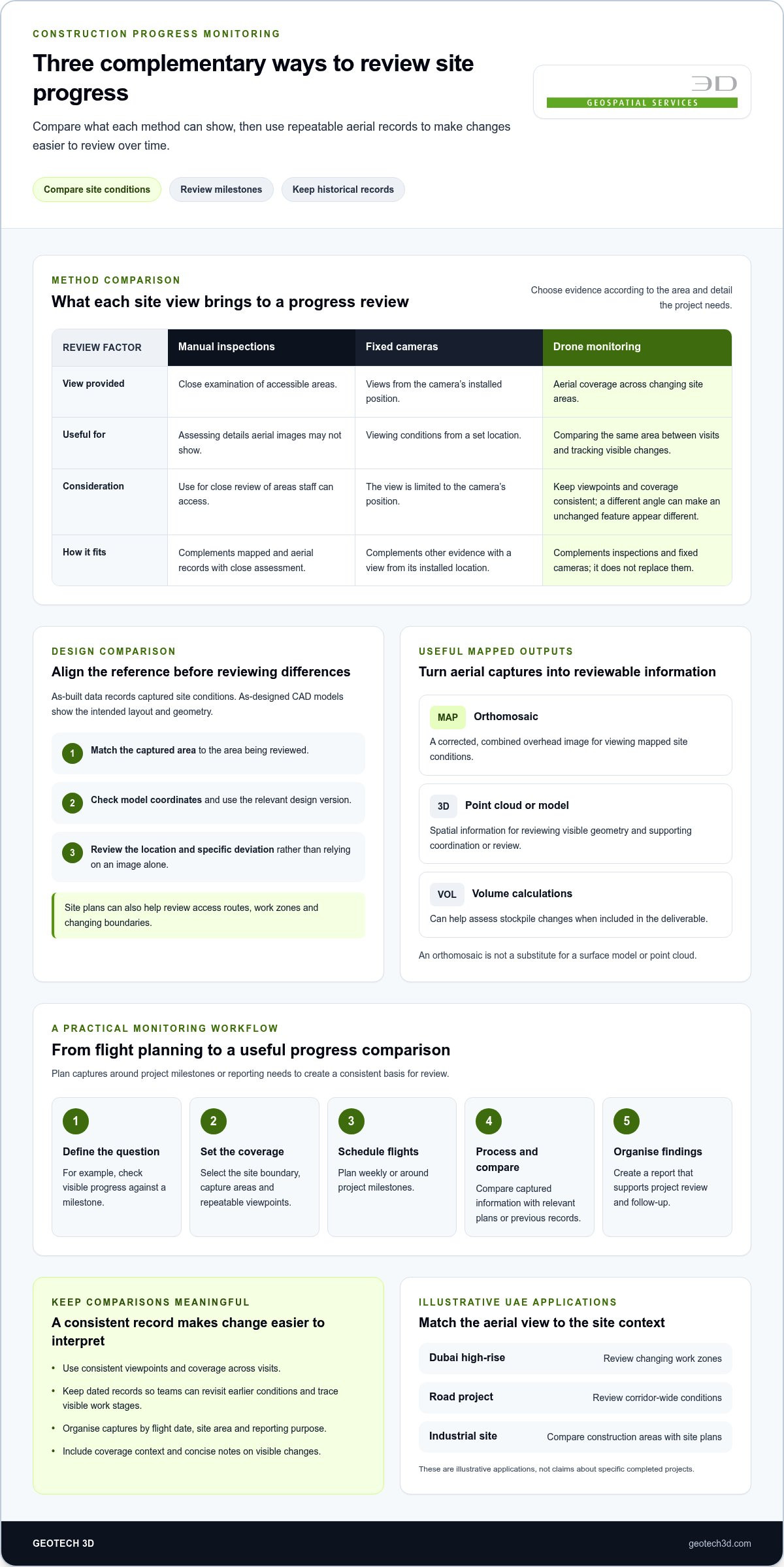
As-built data records conditions captured on site; as-designed CAD models show the intended layout and geometry. Comparing them can reveal visible differences, such as a foundation edge that appears out of line with its drawing or materials stored in a planned work area. The comparison is meaningful only when the captured area, model coordinates and design version align. Review the location and specific deviation rather than relying on an image alone.
Site plans provide another reference for reviewing access routes, work zones and changing boundaries. A drone can capture a broad overhead view, while processed imagery helps locate visible features against the plan. For example, teams can compare the planned position of a temporary access route with its captured condition.
Progress Across Site Visits
Side-by-side records show what changed between visits. Teams can compare the same area, such as a building footprint, road formation or material stockpile. Regular captures, scheduled around milestones or reporting needs, make changes easier to interpret. Consistent viewpoints and coverage matter: a different angle can make an unchanged feature appear different.
Historical comparisons extend the review across the project timeline. Dated records can help managers trace visible work stages, revisit earlier conditions and prepare progress discussions. For a Dubai construction site, teams might compare a current capture with one from a previous milestone. Volume calculations can also help assess stockpile changes when they are part of the deliverable.
Monitoring Versus Other Site Methods
Manual inspections let staff examine accessible areas closely and assess details aerial images may not show. Fixed cameras provide views from their installed positions, but those viewpoints are limited to their locations. Drone monitoring adds repeatable aerial coverage across changing site areas. It complements, rather than replaces, inspections and fixed cameras: choose each method according to the area and evidence required.
Examples in the UAE include a Dubai high-rise, where aerial records can show changing work zones; a road project, where teams can review corridor-wide conditions; and an industrial site, where construction areas can be compared with site plans. These are illustrative applications, not claims about specific completed projects.
In the UAE, the quoted price depends on the mapped area, flight frequency, site constraints and required outputs, such as CAD comparisons or volume calculations. Pricing is provided after a quote request.
A practical starting workflow is to:
- Define the reporting question, such as checking visible progress against a milestone.
- Select the site boundary, capture areas and repeatable viewpoints.
- Schedule flights weekly or around project milestones.
- Process and compare the captured information with the relevant plans or previous records.
- Organise findings into a report that supports project review and follow-up.
This workflow takes teams from a planned flight to a useful comparison, with the output shaped by the project decision at hand.
Cloud-based reports and historical records
Drone captures become useful when images are processed, organised and presented for review. Cloud-based reports can bring mapped outputs, dated records and project notes together, giving authorised team members a shared reference instead of a folder of unlabelled files.
From Images to a Reviewable Record
Start by grouping each capture under its flight date, site area and reporting purpose. Then process the photographs into outputs suited to the question: an orthomosaic for a continuous overhead view, or a 3D point cloud for spatial review. Drone photogrammetry can create geographically accurate 2D maps from photographs. The result gives teams a mapped view they can overlay with a site plan or design drawing.
Keep reports focused on decisions. A construction manager reviewing an access area, for example, needs a dated map, a clear indication of coverage and a concise note on visible changes. Inconsistent file names or missing context make comparisons harder. A standard record structure helps staff find the right capture and understand what it shows.
Point Clouds, Models and Surface Data
A point cloud represents captured surfaces as a collection of spatial points. Teams can use it to inspect visible geometry or develop 3D models for coordination and review. Photogrammetry can also create geographically accurate 3D models from photographs. Model detail depends on capture coverage and processing choices, so the intended use should guide the output. A broad context model and a detailed review of a specific structure have different requirements.
Surface products serve different purposes. A digital surface model, or DSM, represents captured upper surfaces, including visible objects. A digital elevation model, or DEM, represents the ground surface. This distinction affects how teams interpret terrain, stockpiles and built features. An orthomosaic is a corrected, combined overhead image, not a substitute for a surface model or point cloud.
Building a Historical Record
Preserve each report with its capture date, mapped boundary, output type and revision context. On a later visit, teams can compare a new orthomosaic or model with earlier records and add observations to the same timeline. This supports progress reporting and creates a traceable visual history for internal review.
Cloud access should follow the project’s data-management arrangements. Define who can view, download or share each report, and keep source imagery distinct from processed deliverables. For property documentation that also involves strata, real estate strata services may be a relevant part of the wider records workflow.
Data security and airspace compliance
A reliable flight plan involves more than the capture route. In the UAE, address airspace requirements before scheduling a construction-site flight, and control how aerial images move from capture through processing and reporting. These steps help organise operations and govern project information.
Plan UAE Flights Before Capture
Begin by identifying the site boundary, proposed flight area and intended capture date. Check the applicable UAE airspace and operational requirements for that location before confirming the mission. A project inside a restricted or controlled area may need a different plan from a site with fewer constraints. Do not assume an overseas rulebook applies locally. FAA Part 107, for example, is a United States regulatory reference, not the UAE framework.
Align the flight plan with the construction programme. A site manager can identify active cranes, lifting zones, temporary structures and areas requiring restricted access. The pilot can then plan coverage around those conditions and coordinate with site personnel. If conditions change, revise the plan before flying rather than treating the original route as fixed.
Control Images and Processing
Set data-handling rules before capturing images. Define who can access original images, processed outputs and final reports, and organise project folders with clear permissions. A contractor, for example, may need the site orthomosaic, while a wider group may need only an approved progress report. Keeping source files separate from shared deliverables helps manage access and revisions.
Use a traceable processing sequence: transfer the captured images, organise them by site and date, generate the required output, then review it before distribution. Keep the capture date and processing version with each deliverable. If a report needs correction, the team can identify the relevant source images rather than replace files without context.
Match Sensors to the Intended Output
A camera records visible site conditions for image-based products such as orthomosaics. Required coverage and image quality depend on the mapping purpose, flight path and processing workflow. Specify whether the project needs a site overview, a mapped surface or imagery for progress documentation. That decision guides sensor selection and helps avoid collecting data that does not support the report.
Before release, review the processed output for gaps, obscured areas and inconsistencies. A partly blocked work zone, for instance, should not be presented as fully covered. Record limitations in the report and retain the source capture for reference. Clear documentation connects the flight, images, processing and final deliverable in an auditable workflow.
Orthomosaics and volume calculations
An orthomosaic combines overlapping aerial images into a corrected overhead map. On a construction site, it can show ground coverage, visible earthworks and stockpile boundaries in one mapped record. Teams can use it to identify measurement areas and decide whether volume calculations or further survey information are needed.
From Aerial Images to Site Measurements
Start by defining the area and measurement purpose. A stockpile check needs a clear boundary around the material, while an earthwork review may require a defined surface and design reference. Plan the flight to cover the full area consistently. Ground Control Points can support georeferencing and help make drone data accurate to within centimeters.
After processing, check the orthomosaic for gaps, shadows, blurred images and unclear edges. These can affect how confidently a pile boundary or ground feature is interpreted. Mark the measurement boundary consistently, and retain the capture date and processing record. This gives later reviewers context for the mapped surface.
Pit and Pile Volume Calculations
For a stockpile, calculate volume by comparing its captured surface with a defined base surface. The result depends on the boundary and the reference beneath the pile. A boundary drawn too widely may include surrounding ground; one drawn too tightly may omit material at the edges. Record both the boundary and reference so the reported quantity can be interpreted.
Pit measurements use the same surface-comparison principle, but assess the reverse direction of change. Compare the captured surface with a reference representing the surrounding or original ground. For example, a project team can use an excavation’s mapped boundary and surface model to assess removed material. Make the reference surface and capture coverage clear in the deliverable.
Earthwork Measurement and Review
For broader earthworks, compare captured terrain with the relevant design surface or an earlier site record. Differences across the defined area indicate where cut or fill has occurred. A project engineer can review the mapped result alongside the grading plan, checking that boundaries and surface references match the measurement scope.
Follow a repeatable workflow: define the area, establish control, capture the ground, process the imagery, generate the surface, then calculate and review volume. Keep the orthomosaic, surface output and measurement notes together. This helps the team explain how a quantity was derived and compare it with a later capture.
Drone-derived volumes are most useful when their scope is explicit. Record the measured area, reference surface, capture date and processing basis. For a Dubai site with several stockpiles, separate boundaries and results help prevent one material area from being confused with another. Teams can then use the quantities as documented inputs to progress reviews and earthwork coordination.
Portable drone surveying and mapping
Drone surveying provides aerial data capture for construction areas that change over time, without requiring fixed camera installation. A planned flight can document a work zone, access corridor or earthwork area, then produce mapped information for review. Its practical advantage is flexibility: teams can define the area around a project question and adjust coverage as conditions change.
Start with the required output. A visual progress record may need clear images of active work areas, while mapping needs coverage suited to processing into geographically referenced data. Resolution, flight path and site boundaries affect whether features can be interpreted at the intended level. A broad overview of a road corridor, for example, serves a different purpose from a close review of a small excavation.
Mission planning determines how the drone captures the site and how its position is referenced. Ground Control Points help make drone data accurate to within centimeters. Place and position them to support the surveyed area, rather than clustering them in one part of the site. The route should also account for structures or terrain that could obscure the ground from the camera.
A practical mapping sequence starts with defining the boundary and intended use. Plan a flight covering the area, capture overlapping photos, and process them into the selected map or model. Then check for gaps, obscured surfaces and features that need clarification. This makes the capture purpose, mapped extent and final deliverable easier to understand.
Photogrammetry can create geographically accurate 3D models from photographs. These models help teams examine site form and communicate spatial context beyond a single visual image. A project engineer might use a model to review the relationship between a graded area and nearby structures, while a mapped overview can show how access routes relate to active work zones.
Portable capture also supports repeat visits across dispersed or changing work fronts. For example, a contractor managing several sections of a UAE road project can set separate capture boundaries for each section. Keeping boundaries and viewpoints consistent makes later comparisons more useful. The surveying workflow can adapt to site conditions instead of relying on a one-size-fits-all flight.
Choose the output before capture, then align flight coverage, control points and processing with that purpose. This keeps mapping focused on the information the project team needs, whether that is a visual record, a mapped site or a 3D model. GEOTECH 3D’s Drone Services connect aerial capture with surveying and mapping needs.
GEOTECH 3D: topo survey
GEOTECH 3D provides topo survey services for project teams that need mapped site information to support planning, design coordination or construction reporting. A topographic survey can establish the relationship between ground features and the project area, helping teams interpret site conditions alongside drone-captured records. It is a practical next step when aerial imagery alone does not provide the survey information required for a decision.
For broader project requirements, GEOTECH 3D also offers Drone Services, 3D Laser Scanning and GIS & Surveying Services. These offerings support different data needs, from aerial site capture to spatial information for project use. Discuss the site area, intended use and required outputs to identify a suitable surveying scope.
Contact GEOTECH 3D to discuss your project’s topo survey requirements, or visit geotech3d.com.
Make Site Monitoring Part of Project Planning
Construction progress monitoring drones deliver more value when each capture supports a defined project decision. Before planning the next cycle, decide what information the team needs, who will review it and how it will inform coordination. A clear purpose makes monitoring a practical part of project planning, not a separate reporting task.
Build the workflow around your project’s reporting needs. Agree on the areas to review, the format teams can use and how findings will inform discussions with engineers, consultants and project managers. This provides a clear starting point for aerial monitoring on construction projects in Dubai and across the UAE.
A clearly defined monitoring approach can help your team move into the next project phase with greater clarity.
Frequently Asked Questions
How are drones used for construction progress monitoring?
Construction progress monitoring drones capture aerial information to support site reporting and review. Teams can use the outputs to document visible work, annotate areas needing attention and prepare material for coordination meetings. For example, a project manager can mark an area on a map for follow-up with the site engineer. Drone records support decisions, but do not replace inspection of work that imagery cannot reveal.
What types of drones and cameras are best for construction site monitoring?
The right setup depends on the site and inspection output. A visual camera suits general site documentation, while thermal imaging is relevant when the task involves reviewing temperature patterns. Consider whether you need a broad site overview, a detailed view of a structure or a model for spatial review. Let the mission objective guide sensor choice, rather than selecting equipment on specifications alone.
How often should construction sites be surveyed by drone?
Set the survey interval according to the project’s reporting cycle and the rate of visible change. Capture information when managers need to make a decision, such as reviewing a completed work package or preparing a progress update. If activity is stable, frequent capture may add little value; rapidly changing areas may need closer observation. Align the schedule with the construction programme and reporting needs.
What software converts drone imagery into progress reports and 3D models?
Photogrammetry software processes overlapping images into mapped outputs and 3D models, while reporting tools organise those deliverables for project review. Selection should reflect the required file formats, annotation workflow and compatibility with the project team’s existing design environment. Before adopting a platform, test whether a sample output can be opened and reviewed by the people who need it. Software choice depends on deliverables and workflow, not simply the number of features.
How accurate are drone-based construction measurements and progress tracking?
Measurement accuracy depends on the survey method, site conditions, capture quality and intended use. Define the required tolerance before capture, then validate a representative area against suitable survey control or an independent reference. Progress tracking also has limits: imagery can show visible changes, but cannot establish concealed construction quality. Keep measurement requirements separate from visual progress classifications so reports do not suggest more certainty than the data supports.
Do construction drone operators in the UAE need permits or licenses?
For a UAE project, permit and licensing requirements depend on the flight location and activity. Distinguish site access from authorization to operate an aircraft, since one does not replace the other. Before scheduling, identify the applicable approval pathway for the planned operation and location. Do not assume site permission, or a permit used elsewhere, automatically covers a drone flight at a Dubai or other UAE construction site.
What are the safety, privacy, and data-security risks of construction drones?
Risks include capturing neighbouring properties, recording identifiable workers or retaining imagery longer than necessary for the project. Define the capture boundary to avoid unrelated areas, and set a retention period for raw files and reports. Inform site teams about the flight’s purpose and timing to reduce uncertainty during operations. Before external sharing, review image metadata and distribution copies, especially if imagery reveals sensitive site layouts or activities.
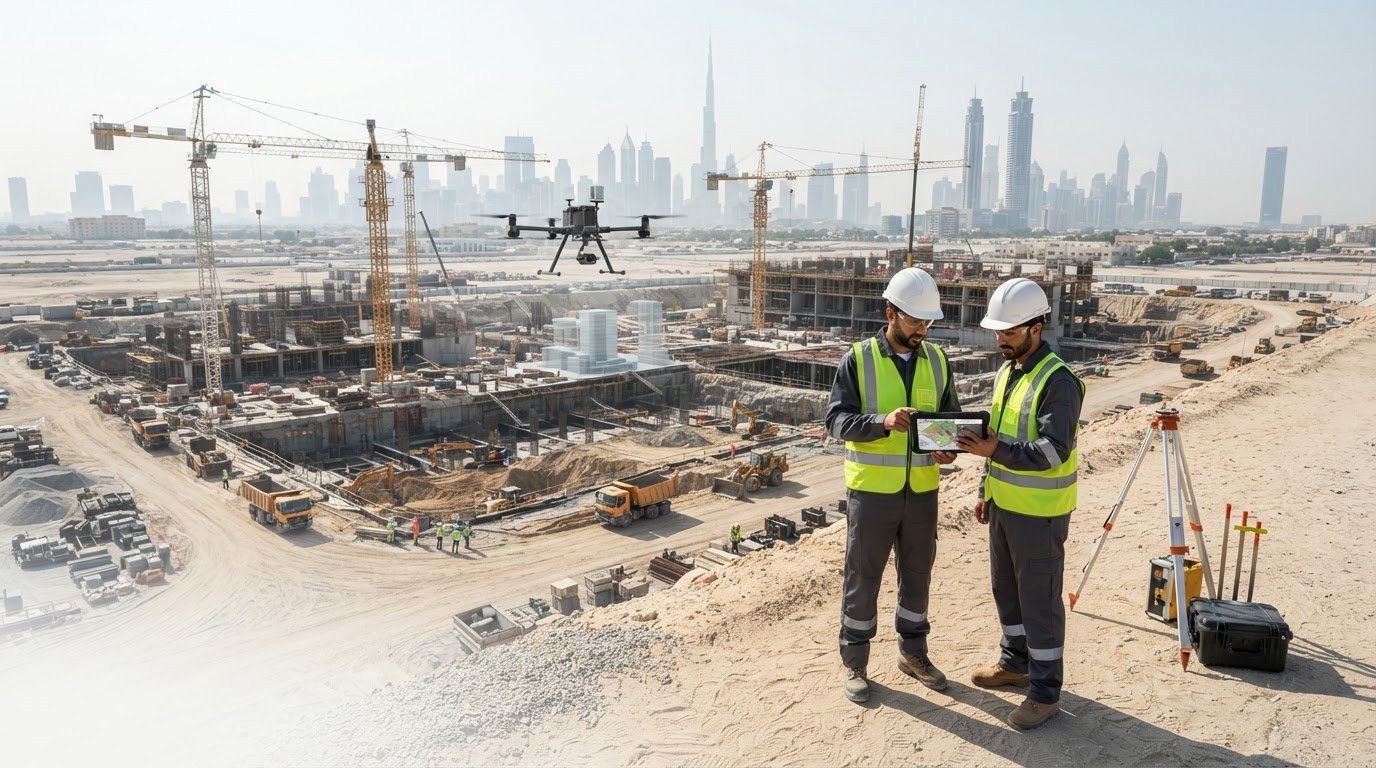
A site can look on schedule from the ground while its overall progress remains difficult to assess. Construction progress monitoring drones capture repeatable aerial records that help teams review activity, compare changes over time and spot issues that may be missed during visual checks. Flights can be planned around project milestones or reporting cycles to create a consistent basis for review.
Aerial records are most useful when they become clear project information, not just a collection of images. Learn how drone monitoring supports construction reporting and historical records, what orthomosaics and volume calculations can show, and how aerial surveying fits into site workflows. The article also covers data handling and planning flights in line with applicable UAE requirements, so you can assess how drone monitoring may support project decisions.
Key Takeaways
- Compare captured site conditions with as-designed CAD models to identify differences and support progress reviews.
- Turn drone imagery into organised reports and historical records that help project teams track changes over time.
- Plan flights around site requirements and applicable UAE airspace rules, while managing project data securely.
- Use orthomosaics, volume calculations and mapped outputs to make site conditions easier to assess and communicate.
- Consider GEOTECH 3D’s topo survey and drone services when your project needs mapped site information for planning or reporting.
What is Drone-Based Construction Progress Monitoring?
Construction progress monitoring drones capture site conditions from the air, giving teams a way to compare visible work with planned designs. Repeat flights create records for reviewing activity, identifying differences and tracking changes against project milestones.
For a Dubai project, the value lies in more than an aerial image. Teams need a consistent view they can compare with CAD models, site plans, schedules and previous captures.
As-Built and Design Comparisons
As-built data records conditions captured on site; as-designed CAD models show the intended layout and geometry. Comparing them can reveal visible differences, such as a foundation edge that appears out of line with its drawing or materials stored in a planned work area. The comparison is meaningful only when the captured area, model coordinates and design version align. Review the location and specific deviation rather than relying on an image alone.
Site plans provide another reference for reviewing access routes, work zones and changing boundaries. A drone can capture a broad overhead view, while processed imagery helps locate visible features against the plan. For example, teams can compare the planned position of a temporary access route with its captured condition.
Progress Across Site Visits
Side-by-side records show what changed between visits. Teams can compare the same area, such as a building footprint, road formation or material stockpile. Regular captures, scheduled around milestones or reporting needs, make changes easier to interpret. Consistent viewpoints and coverage matter: a different angle can make an unchanged feature appear different.
Historical comparisons extend the review across the project timeline. Dated records can help managers trace visible work stages, revisit earlier conditions and prepare progress discussions. For a Dubai construction site, teams might compare a current capture with one from a previous milestone. Volume calculations can also help assess stockpile changes when they are part of the deliverable.
Monitoring Versus Other Site Methods
Manual inspections let staff examine accessible areas closely and assess details aerial images may not show. Fixed cameras provide views from their installed positions, but those viewpoints are limited to their locations. Drone monitoring adds repeatable aerial coverage across changing site areas. It complements, rather than replaces, inspections and fixed cameras: choose each method according to the area and evidence required.
Examples in the UAE include a Dubai high-rise, where aerial records can show changing work zones; a road project, where teams can review corridor-wide conditions; and an industrial site, where construction areas can be compared with site plans. These are illustrative applications, not claims about specific completed projects.
In the UAE, the quoted price depends on the mapped area, flight frequency, site constraints and required outputs, such as CAD comparisons or volume calculations. Pricing is provided after a quote request.
A practical starting workflow is to:
- Define the reporting question, such as checking visible progress against a milestone.
- Select the site boundary, capture areas and repeatable viewpoints.
- Schedule flights weekly or around project milestones.
- Process and compare the captured information with the relevant plans or previous records.
- Organise findings into a report that supports project review and follow-up.
This workflow takes teams from a planned flight to a useful comparison, with the output shaped by the project decision at hand.
Cloud-based reports and historical records
Drone captures become useful when images are processed, organised and presented for review. Cloud-based reports can bring mapped outputs, dated records and project notes together, giving authorised team members a shared reference instead of a folder of unlabelled files.
From Images to a Reviewable Record
Start by grouping each capture under its flight date, site area and reporting purpose. Then process the photographs into outputs suited to the question: an orthomosaic for a continuous overhead view, or a 3D point cloud for spatial review. Drone photogrammetry can create geographically accurate 2D maps from photographs. The result gives teams a mapped view they can overlay with a site plan or design drawing.
Keep reports focused on decisions. A construction manager reviewing an access area, for example, needs a dated map, a clear indication of coverage and a concise note on visible changes. Inconsistent file names or missing context make comparisons harder. A standard record structure helps staff find the right capture and understand what it shows.
Point Clouds, Models and Surface Data
A point cloud represents captured surfaces as a collection of spatial points. Teams can use it to inspect visible geometry or develop 3D models for coordination and review. Photogrammetry can also create geographically accurate 3D models from photographs. Model detail depends on capture coverage and processing choices, so the intended use should guide the output. A broad context model and a detailed review of a specific structure have different requirements.
Surface products serve different purposes. A digital surface model, or DSM, represents captured upper surfaces, including visible objects. A digital elevation model, or DEM, represents the ground surface. This distinction affects how teams interpret terrain, stockpiles and built features. An orthomosaic is a corrected, combined overhead image, not a substitute for a surface model or point cloud.
Building a Historical Record
Preserve each report with its capture date, mapped boundary, output type and revision context. On a later visit, teams can compare a new orthomosaic or model with earlier records and add observations to the same timeline. This supports progress reporting and creates a traceable visual history for internal review.
Cloud access should follow the project’s data-management arrangements. Define who can view, download or share each report, and keep source imagery distinct from processed deliverables. For property documentation that also involves strata, real estate strata services may be a relevant part of the wider records workflow.
Data security and airspace compliance
A reliable flight plan involves more than the capture route. In the UAE, address airspace requirements before scheduling a construction-site flight, and control how aerial images move from capture through processing and reporting. These steps help organise operations and govern project information.
Plan UAE Flights Before Capture
Begin by identifying the site boundary, proposed flight area and intended capture date. Check the applicable UAE airspace and operational requirements for that location before confirming the mission. A project inside a restricted or controlled area may need a different plan from a site with fewer constraints. Do not assume an overseas rulebook applies locally. FAA Part 107, for example, is a United States regulatory reference, not the UAE framework.
Align the flight plan with the construction programme. A site manager can identify active cranes, lifting zones, temporary structures and areas requiring restricted access. The pilot can then plan coverage around those conditions and coordinate with site personnel. If conditions change, revise the plan before flying rather than treating the original route as fixed.
Control Images and Processing
Set data-handling rules before capturing images. Define who can access original images, processed outputs and final reports, and organise project folders with clear permissions. A contractor, for example, may need the site orthomosaic, while a wider group may need only an approved progress report. Keeping source files separate from shared deliverables helps manage access and revisions.
Use a traceable processing sequence: transfer the captured images, organise them by site and date, generate the required output, then review it before distribution. Keep the capture date and processing version with each deliverable. If a report needs correction, the team can identify the relevant source images rather than replace files without context.
Match Sensors to the Intended Output
A camera records visible site conditions for image-based products such as orthomosaics. Required coverage and image quality depend on the mapping purpose, flight path and processing workflow. Specify whether the project needs a site overview, a mapped surface or imagery for progress documentation. That decision guides sensor selection and helps avoid collecting data that does not support the report.
Before release, review the processed output for gaps, obscured areas and inconsistencies. A partly blocked work zone, for instance, should not be presented as fully covered. Record limitations in the report and retain the source capture for reference. Clear documentation connects the flight, images, processing and final deliverable in an auditable workflow.
Orthomosaics and volume calculations
An orthomosaic combines overlapping aerial images into a corrected overhead map. On a construction site, it can show ground coverage, visible earthworks and stockpile boundaries in one mapped record. Teams can use it to identify measurement areas and decide whether volume calculations or further survey information are needed.
From Aerial Images to Site Measurements
Start by defining the area and measurement purpose. A stockpile check needs a clear boundary around the material, while an earthwork review may require a defined surface and design reference. Plan the flight to cover the full area consistently. Ground Control Points can support georeferencing and help make drone data accurate to within centimeters.
After processing, check the orthomosaic for gaps, shadows, blurred images and unclear edges. These can affect how confidently a pile boundary or ground feature is interpreted. Mark the measurement boundary consistently, and retain the capture date and processing record. This gives later reviewers context for the mapped surface.
Pit and Pile Volume Calculations
For a stockpile, calculate volume by comparing its captured surface with a defined base surface. The result depends on the boundary and the reference beneath the pile. A boundary drawn too widely may include surrounding ground; one drawn too tightly may omit material at the edges. Record both the boundary and reference so the reported quantity can be interpreted.
Pit measurements use the same surface-comparison principle, but assess the reverse direction of change. Compare the captured surface with a reference representing the surrounding or original ground. For example, a project team can use an excavation’s mapped boundary and surface model to assess removed material. Make the reference surface and capture coverage clear in the deliverable.
Earthwork Measurement and Review
For broader earthworks, compare captured terrain with the relevant design surface or an earlier site record. Differences across the defined area indicate where cut or fill has occurred. A project engineer can review the mapped result alongside the grading plan, checking that boundaries and surface references match the measurement scope.
Follow a repeatable workflow: define the area, establish control, capture the ground, process the imagery, generate the surface, then calculate and review volume. Keep the orthomosaic, surface output and measurement notes together. This helps the team explain how a quantity was derived and compare it with a later capture.
Drone-derived volumes are most useful when their scope is explicit. Record the measured area, reference surface, capture date and processing basis. For a Dubai site with several stockpiles, separate boundaries and results help prevent one material area from being confused with another. Teams can then use the quantities as documented inputs to progress reviews and earthwork coordination.
Portable drone surveying and mapping
Drone surveying provides aerial data capture for construction areas that change over time, without requiring fixed camera installation. A planned flight can document a work zone, access corridor or earthwork area, then produce mapped information for review. Its practical advantage is flexibility: teams can define the area around a project question and adjust coverage as conditions change.
Start with the required output. A visual progress record may need clear images of active work areas, while mapping needs coverage suited to processing into geographically referenced data. Resolution, flight path and site boundaries affect whether features can be interpreted at the intended level. A broad overview of a road corridor, for example, serves a different purpose from a close review of a small excavation.
Mission planning determines how the drone captures the site and how its position is referenced. Ground Control Points help make drone data accurate to within centimeters. Place and position them to support the surveyed area, rather than clustering them in one part of the site. The route should also account for structures or terrain that could obscure the ground from the camera.
A practical mapping sequence starts with defining the boundary and intended use. Plan a flight covering the area, capture overlapping photos, and process them into the selected map or model. Then check for gaps, obscured surfaces and features that need clarification. This makes the capture purpose, mapped extent and final deliverable easier to understand.
Photogrammetry can create geographically accurate 3D models from photographs. These models help teams examine site form and communicate spatial context beyond a single visual image. A project engineer might use a model to review the relationship between a graded area and nearby structures, while a mapped overview can show how access routes relate to active work zones.
Portable capture also supports repeat visits across dispersed or changing work fronts. For example, a contractor managing several sections of a UAE road project can set separate capture boundaries for each section. Keeping boundaries and viewpoints consistent makes later comparisons more useful. The surveying workflow can adapt to site conditions instead of relying on a one-size-fits-all flight.
Choose the output before capture, then align flight coverage, control points and processing with that purpose. This keeps mapping focused on the information the project team needs, whether that is a visual record, a mapped site or a 3D model. GEOTECH 3D’s Drone Services connect aerial capture with surveying and mapping needs.
GEOTECH 3D: topo survey
GEOTECH 3D provides topo survey services for project teams that need mapped site information to support planning, design coordination or construction reporting. A topographic survey can establish the relationship between ground features and the project area, helping teams interpret site conditions alongside drone-captured records. It is a practical next step when aerial imagery alone does not provide the survey information required for a decision.
For broader project requirements, GEOTECH 3D also offers Drone Services, 3D Laser Scanning and GIS & Surveying Services. These offerings support different data needs, from aerial site capture to spatial information for project use. Discuss the site area, intended use and required outputs to identify a suitable surveying scope.
Contact GEOTECH 3D to discuss your project’s topo survey requirements, or visit geotech3d.com.
Make Site Monitoring Part of Project Planning
Construction progress monitoring drones deliver more value when each capture supports a defined project decision. Before planning the next cycle, decide what information the team needs, who will review it and how it will inform coordination. A clear purpose makes monitoring a practical part of project planning, not a separate reporting task.
Build the workflow around your project’s reporting needs. Agree on the areas to review, the format teams can use and how findings will inform discussions with engineers, consultants and project managers. This provides a clear starting point for aerial monitoring on construction projects in Dubai and across the UAE.
A clearly defined monitoring approach can help your team move into the next project phase with greater clarity.
Frequently Asked Questions
How are drones used for construction progress monitoring?
Construction progress monitoring drones capture aerial information to support site reporting and review. Teams can use the outputs to document visible work, annotate areas needing attention and prepare material for coordination meetings. For example, a project manager can mark an area on a map for follow-up with the site engineer. Drone records support decisions, but do not replace inspection of work that imagery cannot reveal.
What types of drones and cameras are best for construction site monitoring?
The right setup depends on the site and inspection output. A visual camera suits general site documentation, while thermal imaging is relevant when the task involves reviewing temperature patterns. Consider whether you need a broad site overview, a detailed view of a structure or a model for spatial review. Let the mission objective guide sensor choice, rather than selecting equipment on specifications alone.
How often should construction sites be surveyed by drone?
Set the survey interval according to the project’s reporting cycle and the rate of visible change. Capture information when managers need to make a decision, such as reviewing a completed work package or preparing a progress update. If activity is stable, frequent capture may add little value; rapidly changing areas may need closer observation. Align the schedule with the construction programme and reporting needs.
What software converts drone imagery into progress reports and 3D models?
Photogrammetry software processes overlapping images into mapped outputs and 3D models, while reporting tools organise those deliverables for project review. Selection should reflect the required file formats, annotation workflow and compatibility with the project team’s existing design environment. Before adopting a platform, test whether a sample output can be opened and reviewed by the people who need it. Software choice depends on deliverables and workflow, not simply the number of features.
How accurate are drone-based construction measurements and progress tracking?
Measurement accuracy depends on the survey method, site conditions, capture quality and intended use. Define the required tolerance before capture, then validate a representative area against suitable survey control or an independent reference. Progress tracking also has limits: imagery can show visible changes, but cannot establish concealed construction quality. Keep measurement requirements separate from visual progress classifications so reports do not suggest more certainty than the data supports.
Do construction drone operators in the UAE need permits or licenses?
For a UAE project, permit and licensing requirements depend on the flight location and activity. Distinguish site access from authorization to operate an aircraft, since one does not replace the other. Before scheduling, identify the applicable approval pathway for the planned operation and location. Do not assume site permission, or a permit used elsewhere, automatically covers a drone flight at a Dubai or other UAE construction site.
What are the safety, privacy, and data-security risks of construction drones?
Risks include capturing neighbouring properties, recording identifiable workers or retaining imagery longer than necessary for the project. Define the capture boundary to avoid unrelated areas, and set a retention period for raw files and reports. Inform site teams about the flight’s purpose and timing to reduce uncertainty during operations. Before external sharing, review image metadata and distribution copies, especially if imagery reveals sensitive site layouts or activities.
Search Now
Error: Contact form not found.