

Our Services
Compare Native Features, Integrations, and Workarounds
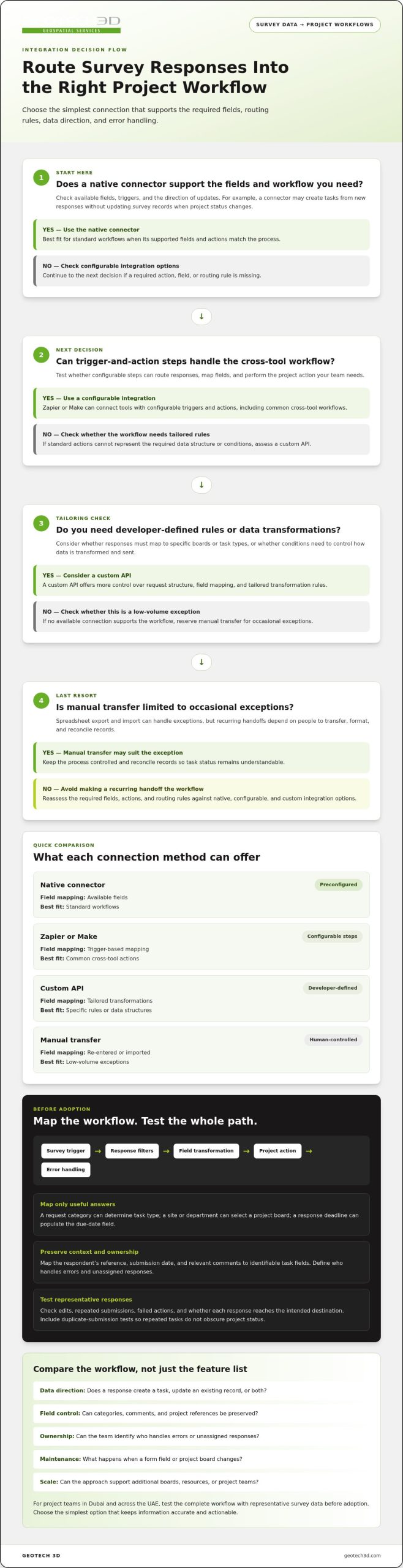
The most reliable way to integrate survey data with project management software is to use a native feature if it supports the fields and workflow you need, a custom API for tailored mapping or synchronization, and a workaround only as a last resort. Native connectors can sync information between systems, while APIs give you more control over turning survey responses into project tasks, updates, or reports. The right option depends on how data needs to move and who will use it.
A straightforward connection is a sensible preference, but a quick setup helps only if the resulting data stays accurate and actionable. This article compares native features, custom APIs, and workarounds, then explains how to assess them against practical criteria such as data flow, maintenance, and workflow fit. You’ll also learn how to test a connection and choose an approach for teams managing projects in Dubai and across the UAE.
Key Takeaways
- Start with a native connector when it supports the data fields and workflow your team needs; consider a custom API for more tailored mapping and synchronization.
- Define which survey responses should create or update project records, and specify how errors and duplicate data will be handled.
- Keep manual transfers to a minimum by identifying repetitive handoffs and automating only the steps that improve data consistency and usability.
- Compare software options against your project scale, security needs, integration requirements, and total cost of ownership over 3 to 5 years.
- Test the full workflow with representative survey data before adoption, and treat workarounds as a last resort when native features and integrations fall short.
API architecture and custom integrations
Choose a connection method by checking the direction of data flow, its structure, and where it needs to go. A clear data map helps teams coordinate workflows, project boards, and resource planning.
Custom API Integrations
A custom API integration transfers selected survey data into project management software using defined requests and field mappings. Unlike a native connector or prebuilt automation, it can apply tailored rules to specific boards, task types, and response conditions.
To connect tools using Zapier, Make, or APIs, set a survey-submission trigger, map its fields to a project action, then test it with sample responses. Zapier and Make provide configurable trigger-and-action workflows; a custom API gives developers more control over request structure and transformation rules. This approach suits teams whose needs go beyond standard actions.
Survey-to-Task Field Mapping
Map useful survey answers to task or custom fields rather than transferring every response unchanged. For example, a request category can determine the task type, a site or department can select a project board, and a response deadline can populate the due-date field.
Preserve context by mapping the respondent’s reference, submission date, and relevant comments to identifiable task fields. Use consistent labels for choices such as “access issue” or “design feedback,” so teams can filter and report responses without interpreting each free-text answer.
Automated Task Creation and Assignment
Automated task creation uses a response condition to create a project task. For example, an “urgent review” answer could trigger a task on a designated board, while a routine comment goes to a review queue.
Assign tasks using a defined rule, such as matching a survey category to the responsible team or resource. Include a fallback queue for responses without a clear match, and test duplicate submissions so repeated tasks don’t obscure project status.
Customizable request forms can improve the information entering this workflow. Make project, location, request type, and priority required fields, then add conditional questions that appear only when relevant. Brief guidance beside each question can help respondents distinguish a site access issue from a design coordination request.
Before building, document the sequence: survey trigger, response filters, field transformation, project action, and error handling. Separating data capture from task logic makes it easier to identify which step needs adjustment when an answer reaches the wrong destination.
| Integration option | Setup control | Field mapping | Best fit |
|---|---|---|---|
| Native connector | Preconfigured | Available fields | Standard workflows |
| Zapier or Make | Configurable steps | Trigger-based mapping | Common cross-tool actions |
| Custom API | Developer-defined | Tailored transformations | Specific rules or data structures |
| Manual transfer | Human-controlled | Re-entered or imported | Low-volume exceptions |
Choose the simplest option that supports the required fields, routing rules, and error handling. Use a custom API when those needs exceed preconfigured workflows. This keeps the integration aligned with the actual process.
Choosing between native features, integrations, and workarounds
Compare connection methods for data accuracy, setup effort, maintenance, and the ability to support a growing workflow. A team sending routine feedback to one project board, for example, may need less flexibility than an organization routing responses across portfolios.
Native features are a practical starting point when the survey and project platforms support the connection you need. Check whether the available fields, triggers, and update direction fit the workflow. A connector that creates tasks from new responses may not update survey records when project status changes.
Third-party integrations can connect tools when native features don’t support a required action. Test their trigger conditions and field controls against a real response, such as routing a “site access” selection to a designated review board. Confirm that the integration handles edits, repeated submissions, and failed actions in ways your team can manage.
Workarounds, such as exporting responses and importing a spreadsheet, can handle an occasional exception. They depend on people to transfer, format, and reconcile records, so use them only when a required feature isn’t available natively or through an integration. A recurring manual handoff can reduce efficiency and make task status harder to keep consistent.
Compare each option using the same workflow, rather than judging it by its feature list alone:
- Data direction: Does a response create a task, update an existing record, or both?
- Field control: Can the connection preserve categories, comments, and project references?
- Ownership: Can the assigned team members see who handles errors or unassigned responses?
- Maintenance: What happens when a form field or project board changes?
- Scale: Can the approach support additional boards, resources, or project teams?
For example, a Dubai project team collecting regular progress feedback may prefer a native connector if it routes responses to the right board and keeps status information aligned. If the connector can’t distinguish project locations, a configurable integration may provide more control. A spreadsheet transfer may suit a one-off review but is less suitable for ongoing collaboration.
Test the leading option with representative responses before adopting it. Include a normal answer, an incomplete submission, and a changed response. Trace each record into the project tool, inspect its owner and fields, and note any manual corrections. This reveals whether the option fits the intended workflow.
Choose the simplest method that meets workflow requirements and remains manageable as boards, fields, and team responsibilities change. Reserve workarounds for defined exceptions, with a clear owner and transfer process.
Benefits of reducing manual data transfers
Manual handoffs create more opportunities for survey information to be delayed, duplicated, or entered inconsistently. Copying a response from Microsoft Excel into a project board, for example, may separate the original comment from its assigned task. A connected workflow can transfer selected answers into project records, giving team members a clearer view of progress.
Reducing re-entry also makes ownership easier to trace. If a survey response reports a blocked approval, a workflow can bring its category, project reference, and comment together in one task. Project leads can review the issue alongside other work instead of reconciling separate spreadsheets and board updates.
To assess whether survey integrations improve project planning and delivery, record a baseline before activation and compare the same workflow afterward. Track response-to-task time, correction frequency, missing fields, task ownership, and whether reported issues reach the appropriate project board.
Use a defined measurement process instead of relying on a general impression of efficiency:
- Choose a workflow: Select one recurring survey, such as a project status or stakeholder feedback form.
- Record its current path: Note where responses are copied, who updates the task, and where delays or corrections occur.
- Activate the connection: Route selected answers into the relevant board and retain a reference to the submitted response.
- Review the same indicators: Compare completion, field accuracy, assignment, and status visibility across the two workflows.
For example, a project manager can compare survey submissions with tasks created on a Microsoft-based project board. If a task lacks a location or project reference, refine the mapping. If the record arrives correctly but remains unassigned, review the routing rule. These checks distinguish data-transfer problems from gaps in responsibility.
Fewer transfers can also improve collaboration between planning and delivery teams. A survey answer about a resource constraint, for instance, can appear beside the affected task instead of in a separate file. This gives the project team a shared record to review while preserving the context needed to understand the issue.
Build a review point into the workflow. Compare each survey response with its project record, inspect exceptions, and update field rules when forms or boards change. A clear exception queue helps teams identify incomplete answers instead of silently dropping them. These measures show whether the connection supports planning decisions, timely ownership, and visible progress, rather than simply moving data between tools.
An additional way to assess the value of fewer handoffs is to consider the time they consume across the wider workforce. The page estimates that a single knowledge worker wastes an average of $16.5k annually and that knowledge workers waste 89 working days per year. These estimates underline why reducing repeated entry and follow-up can matter beyond one project record: time spent reconciling information is time unavailable for planning and delivery.
The page estimates the annual cost of wasted time at $52m. Teams can use this broader context alongside their own workflow measures, while still checking that connected records remain accurate and assigned. The aim is not simply to move answers faster, but to make useful information available where project decisions and actions are managed.
Comparing and testing software options
Compare platforms against the workflows they need to support, not just their feature lists. Integration costs depend on licensing, configuration, data mapping, development, testing, and ongoing maintenance.
Software Option Comparisons
Assess software options by how well each platform fits project scale, integration needs, access controls, and reporting requirements. Test each candidate using the same survey workflow, so the comparison reflects practical performance rather than different demonstrations.
For example, submit a sample response and trace it to the project record. Check whether the right fields appear, the responsible team can find the record, and project leads can use its status in reports. If you’re assessing AI features, test the specific task or summary your team expects them to support.
A consistent comparison can focus on these criteria:
- Project fit: Can the platform represent your projects, work packages, and teams?
- Integration: Can survey responses reach the correct records with useful context?
- Access: Can permissions reflect who needs to view or act on submitted information?
- Reporting: Can managers follow response status and outstanding work?
- Usability: Can the people responsible for the workflow complete their tasks clearly?
Run a focused test with realistic cases, including a complete response, an incomplete one, and an answer that needs review. Record manual corrections and reporting gaps. This helps distinguish platform limitations from configuration problems or training needs.
Integration Cost Assessment
Integration cost assessment considers the work and resources needed to build and maintain the connection. The price depends on the case and is given after a quote request; relevant factors include the number of systems, field-mapping complexity, custom development, testing, and support.
Separate recurring software charges from setup and maintenance work. A standard connector may need less custom configuration, while a tailored API can require additional design and testing. Compare options using the same scope, including the workflows, data fields, and reporting needs your team expects to support.
Also consider operational effort. Identify who will maintain field mappings, review failures, and adapt the workflow when survey forms or project structures change. A solution with a lighter initial setup may need more manual oversight, while a tailored connection may require specialist maintenance.
Document evaluation results and the assumptions behind them. Select a platform that meets defined workflow requirements, provides usable reports, and has a manageable support model. This makes the decision defensible and based on demonstrated fit, not untested features.
Project-management software integrations
Integrating survey data with project management software means connecting selected responses to the project records where teams act on them. Depending on the tools and required actions, the workflow can use a platform connector, an automation service, or a custom connection.
Survey Data Integration
Start by identifying the survey event that should prompt a project update, such as a submitted response or a changed answer. Define the destination and decide what information project teams need to see. For example, a response about a site condition could go to the relevant project record, while unrelated feedback stays in the survey system.
For a Microsoft Project workflow, document how the team will recognize and review each incoming item. A consistent project reference can help distinguish submissions for separate sites or work packages.
To support consent and appropriate data access, explain the purpose of collecting responses and their intended project use in the survey form. Transfer only the information the workflow requires, and set permissions so only appropriate roles can view sensitive responses.
Integration Risks and Limitations
Every connection relies on compatible fields, stable workflows, and clear ownership. A changed question or destination can leave a response unmapped, while an overly broad transfer can expose details to people who don’t need them. Free-text answers may also need human interpretation before they can inform a project decision.
Set a process for reviewing exceptions. For instance, route responses with missing project references for manual review instead of automatically assigning them to an uncertain destination.
Before routine use, test the connection with representative submissions. Check how it handles edited answers, incomplete responses, and repeated entries, then document who investigates failures and restores the intended workflow.
- Limit access: Match project permissions to the sensitivity of transferred responses.
- Preserve context: Keep a clear connection between each project record and its source response.
- Handle exceptions: Give unassigned or incomplete submissions a defined review path.
- Review changes: Reassess the workflow when survey questions or project structures change.
These controls help teams connect survey feedback to project work while keeping data handling clear and manageable.
In the survey, 71% of respondents strongly or moderately agreed that document sharing would take place through project management software in the future. That expectation makes it useful to define how shared documents relate to survey-driven project records. Teams can decide whether a response should create a document-sharing task, update an existing record, or simply provide context for a project discussion. Keep the response’s source and project reference available to reviewers, and clarify who is responsible for checking that shared material is current and appropriate for its audience. These steps can help prevent a project update from being mistaken for an approved document or decision.
Leading enterprise PPM platforms provide native connectors to SAP S/4HANA and Oracle ERP. Where those systems are part of the workflow, assess whether a connector supports the specific fields and actions required, rather than assuming that availability ensures a complete fit. Confirm how records are matched, what happens when information is missing, and how changes are handled. A small, reviewed test can help establish whether survey responses reach the intended project context before teams rely on the connection for routine work. Keep ownership clear across the survey and project systems so that mapping issues and access questions have a defined route for resolution.
GEOTECH 3D: topo survey
GEOTECH 3D provides topo survey services for projects that need site information to support planning and coordination. When teams are connecting survey records with project management workflows, a topo survey can provide relevant site context for project decisions and task discussions.
For projects requiring a different view of existing conditions, GEOTECH 3D also offers 3D Laser Scanning, Drone Services, and GIS & Surveying Services. The appropriate service depends on the project’s information needs and how teams intend to use the resulting data.
Discuss your project requirements with GEOTECH 3D to explore a suitable topo survey approach.
Turn the integration plan into a practical next step
Before expanding a connection across teams, select one project workflow and define what information should reach the project record. A focused rollout lets project managers assess whether the data supports decisions, fits existing responsibilities, and makes sense to the people using it.
For projects in Dubai and across the UAE, integrating survey data with project management software works best when incoming information has a clear purpose. Align survey outputs, project fields, and team responsibilities so connected data supports coordination instead of creating another layer to manage.
Where project planning depends on reliable site information, GEOTECH 3D can help identify a suitable surveying approach for the work. Share the project context and the information your team needs to use in its planning process.
A well-considered integration can become a useful part of project delivery. Start with a defined need, give the workflow clear ownership, and build from there with confidence.
Frequently Asked Questions
Which project management tools support native survey integrations?
Native survey integrations depend on the specific pairing of survey and project management tools. Asana, Jira, Trello, Monday.com, and Microsoft Project may connect through a built-in connector when both vendors support the required workflow. Check supported actions, such as creating tasks or updating records, rather than assuming the connector provides full two-way synchronization. If native support doesn’t fit, an automation platform or API can offer another connection route.
What survey platforms integrate with Asana, Jira, Trello, Monday.com, or Microsoft Project?
Survey platforms can connect to Asana, Jira, Trello, Monday.com, or Microsoft Project through native integrations where available, automation services such as Zapier or Make, or a custom API. Compatible survey products depend on the exact platform pairing and required actions. For a practical comparison, choose a representative response and test whether it reaches the intended board or project with its key fields and context intact.

The most reliable way to integrate survey data with project management software is to use a native feature if it supports the fields and workflow you need, a custom API for tailored mapping or synchronization, and a workaround only as a last resort. Native connectors can sync information between systems, while APIs give you more control over turning survey responses into project tasks, updates, or reports. The right option depends on how data needs to move and who will use it.
A straightforward connection is a sensible preference, but a quick setup helps only if the resulting data stays accurate and actionable. This article compares native features, custom APIs, and workarounds, then explains how to assess them against practical criteria such as data flow, maintenance, and workflow fit. You’ll also learn how to test a connection and choose an approach for teams managing projects in Dubai and across the UAE.
Key Takeaways
- Start with a native connector when it supports the data fields and workflow your team needs; consider a custom API for more tailored mapping and synchronization.
- Define which survey responses should create or update project records, and specify how errors and duplicate data will be handled.
- Keep manual transfers to a minimum by identifying repetitive handoffs and automating only the steps that improve data consistency and usability.
- Compare software options against your project scale, security needs, integration requirements, and total cost of ownership over 3 to 5 years.
- Test the full workflow with representative survey data before adoption, and treat workarounds as a last resort when native features and integrations fall short.
API architecture and custom integrations
Choose a connection method by checking the direction of data flow, its structure, and where it needs to go. A clear data map helps teams coordinate workflows, project boards, and resource planning.
Custom API Integrations
A custom API integration transfers selected survey data into project management software using defined requests and field mappings. Unlike a native connector or prebuilt automation, it can apply tailored rules to specific boards, task types, and response conditions. Teams that require complex logic or lack in-house engineering capacity often engage custom software specialists like Global Dev Solutions ApS to build and maintain these tailored pipelines.
Survey-to-Task Field Mapping
Map useful survey answers to task or custom fields rather than transferring every response unchanged. For example, a request category can determine the task type, a site or department can select a project board, and a response deadline can populate the due-date field.
Preserve context by mapping the respondent’s reference, submission date, and relevant comments to identifiable task fields. Use consistent labels for choices such as “access issue” or “design feedback,” so teams can filter and report responses without interpreting each free-text answer.
Automated Task Creation and Assignment
Automated task creation uses a response condition to create a project task. For example, an “urgent review” answer could trigger a task on a designated board, while a routine comment goes to a review queue.
Assign tasks using a defined rule, such as matching a survey category to the responsible team or resource. Include a fallback queue for responses without a clear match, and test duplicate submissions so repeated tasks don’t obscure project status.
Customizable request forms can improve the information entering this workflow. Make project, location, request type, and priority required fields, then add conditional questions that appear only when relevant. Brief guidance beside each question can help respondents distinguish a site access issue from a design coordination request.
Before building, document the sequence: survey trigger, response filters, field transformation, project action, and error handling. Separating data capture from task logic makes it easier to identify which step needs adjustment when an answer reaches the wrong destination.
| Integration option | Setup control | Field mapping | Best fit |
|---|---|---|---|
| Native connector | Preconfigured | Available fields | Standard workflows |
| Zapier or Make | Configurable steps | Trigger-based mapping | Common cross-tool actions |
| Custom API | Developer-defined | Tailored transformations | Specific rules or data structures |
| Manual transfer | Human-controlled | Re-entered or imported | Low-volume exceptions |
Choose the simplest option that supports the required fields, routing rules, and error handling. Use a custom API when those needs exceed preconfigured workflows. This keeps the integration aligned with the actual process.
Choosing between native features, integrations, and workarounds
Compare connection methods for data accuracy, setup effort, maintenance, and the ability to support a growing workflow. A team sending routine feedback to one project board, for example, may need less flexibility than an organization routing responses across portfolios.
Native features are a practical starting point when the survey and project platforms support the connection you need. Check whether the available fields, triggers, and update direction fit the workflow. A connector that creates tasks from new responses may not update survey records when project status changes.
Third-party integrations can connect tools when native features don’t support a required action. Test their trigger conditions and field controls against a real response, such as routing a “site access” selection to a designated review board. Confirm that the integration handles edits, repeated submissions, and failed actions in ways your team can manage.
Workarounds, such as exporting responses and importing a spreadsheet, can handle an occasional exception. They depend on people to transfer, format, and reconcile records, so use them only when a required feature isn’t available natively or through an integration. A recurring manual handoff can reduce efficiency and make task status harder to keep consistent.
Compare each option using the same workflow, rather than judging it by its feature list alone:
- Data direction: Does a response create a task, update an existing record, or both?
- Field control: Can the connection preserve categories, comments, and project references?
- Ownership: Can the assigned team members see who handles errors or unassigned responses?
- Maintenance: What happens when a form field or project board changes?
- Scale: Can the approach support additional boards, resources, or project teams?
For example, a Dubai project team collecting regular progress feedback may prefer a native connector if it routes responses to the right board and keeps status information aligned. If the connector can’t distinguish project locations, a configurable integration may provide more control. A spreadsheet transfer may suit a one-off review but is less suitable for ongoing collaboration.
Test the leading option with representative responses before adopting it. Include a normal answer, an incomplete submission, and a changed response. Trace each record into the project tool, inspect its owner and fields, and note any manual corrections. This reveals whether the option fits the intended workflow.
Choose the simplest method that meets workflow requirements and remains manageable as boards, fields, and team responsibilities change. Reserve workarounds for defined exceptions, with a clear owner and transfer process.
Benefits of reducing manual data transfers
Manual handoffs create more opportunities for survey information to be delayed, duplicated, or entered inconsistently. Copying a response from Microsoft Excel into a project board, for example, may separate the original comment from its assigned task. A connected workflow can transfer selected answers into project records, giving team members a clearer view of progress.
Reducing re-entry also makes ownership easier to trace. If a survey response reports a blocked approval, a workflow can bring its category, project reference, and comment together in one task. Project leads can review the issue alongside other work instead of reconciling separate spreadsheets and board updates.
To assess whether survey integrations improve project planning and delivery, record a baseline before activation and compare the same workflow afterward. Track response-to-task time, correction frequency, missing fields, task ownership, and whether reported issues reach the appropriate project board.
Use a defined measurement process instead of relying on a general impression of efficiency:
- Choose a workflow: Select one recurring survey, such as a project status or stakeholder feedback form.
- Record its current path: Note where responses are copied, who updates the task, and where delays or corrections occur.
- Activate the connection: Route selected answers into the relevant board and retain a reference to the submitted response.
- Review the same indicators: Compare completion, field accuracy, assignment, and status visibility across the two workflows.
For example, a project manager can compare survey submissions with tasks created on a Microsoft-based project board. If a task lacks a location or project reference, refine the mapping. If the record arrives correctly but remains unassigned, review the routing rule. These checks distinguish data-transfer problems from gaps in responsibility.
Fewer transfers can also improve collaboration between planning and delivery teams. A survey answer about a resource constraint, for instance, can appear beside the affected task instead of in a separate file. This gives the project team a shared record to review while preserving the context needed to understand the issue.
Build a review point into the workflow. Compare each survey response with its project record, inspect exceptions, and update field rules when forms or boards change. A clear exception queue helps teams identify incomplete answers instead of silently dropping them. These measures show whether the connection supports planning decisions, timely ownership, and visible progress, rather than simply moving data between tools.
An additional way to assess the value of fewer handoffs is to consider the time they consume across the wider workforce. The page estimates that a single knowledge worker wastes an average of $16.5k annually and that knowledge workers waste 89 working days per year. These estimates underline why reducing repeated entry and follow-up can matter beyond one project record: time spent reconciling information is time unavailable for planning and delivery.
The page estimates the annual cost of wasted time at $52m. Teams can use this broader context alongside their own workflow measures, while still checking that connected records remain accurate and assigned. The aim is not simply to move answers faster, but to make useful information available where project decisions and actions are managed.
Comparing and testing software options
Compare platforms against the workflows they need to support, not just their feature lists. Integration costs depend on licensing, configuration, data mapping, development, testing, and ongoing maintenance.
Software Option Comparisons
Assess software options by how well each platform fits project scale, integration needs, access controls, and reporting requirements. Test each candidate using the same survey workflow, so the comparison reflects practical performance rather than different demonstrations.
For example, submit a sample response and trace it to the project record. Check whether the right fields appear, the responsible team can find the record, and project leads can use its status in reports. If you’re assessing AI features, test the specific task or summary your team expects them to support.
A consistent comparison can focus on these criteria:
- Project fit: Can the platform represent your projects, work packages, and teams?
- Integration: Can survey responses reach the correct records with useful context?
- Access: Can permissions reflect who needs to view or act on submitted information?
- Reporting: Can managers follow response status and outstanding work?
- Usability: Can the people responsible for the workflow complete their tasks clearly?
Run a focused test with realistic cases, including a complete response, an incomplete one, and an answer that needs review. Record manual corrections and reporting gaps. This helps distinguish platform limitations from configuration problems or training needs.
Integration Cost Assessment
Integration cost assessment considers the work and resources needed to build and maintain the connection. The price depends on the case and is given after a quote request; relevant factors include the number of systems, field-mapping complexity, custom development, testing, and support.
Separate recurring software charges from setup and maintenance work. A standard connector may need less custom configuration, while a tailored API can require additional design and testing. Compare options using the same scope, including the workflows, data fields, and reporting needs your team expects to support.
Document evaluation results and the assumptions behind them. Select a platform that meets defined workflow requirements, provides usable reports, and has a manageable support model. This makes the decision defensible and based on demonstrated fit, not untested features.
Project-management software integrations
Integrating survey data with project management software means connecting selected responses to the project records where teams act on them. Depending on the tools and required actions, the workflow can use a platform connector, an automation service, or a custom connection.
Survey Data Integration
Start by identifying the survey event that should prompt a project update, such as a submitted response or a changed answer. Define the destination and decide what information project teams need to see. For example, a response about a site condition could go to the relevant project record, while unrelated feedback stays in the survey system.
For a Microsoft Project workflow, document how the team will recognize and review each incoming item. A consistent project reference can help distinguish submissions for separate sites or work packages.
To support consent and appropriate data access, explain the purpose of collecting responses and their intended project use in the survey form. Transfer only the information the workflow requires, and set permissions so only appropriate roles can view sensitive responses.
Integration Risks and Limitations
Every connection relies on compatible fields, stable workflows, and clear ownership. A changed question or destination can leave a response unmapped, while an overly broad transfer can expose details to people who don’t need them. Free-text answers may also need human interpretation before they can inform a project decision.
Set a process for reviewing exceptions. For instance, route responses with missing project references for manual review instead of automatically assigning them to an uncertain destination.
Before routine use, test the connection with representative submissions. Check how it handles edited answers, incomplete responses, and repeated entries, then document who investigates failures and restores the intended workflow.
- Limit access: Match project permissions to the sensitivity of transferred responses.
- Preserve context: Keep a clear connection between each project record and its source response.
- Handle exceptions: Give unassigned or incomplete submissions a defined review path.
- Review changes: Reassess the workflow when survey questions or project structures change.
These controls help teams connect survey feedback to project work while keeping data handling clear and manageable.
In the survey, 71% of respondents strongly or moderately agreed that document sharing would take place through project management software in the future. That expectation makes it useful to define how shared documents relate to survey-driven project records. Teams can decide whether a response should create a document-sharing task, update an existing record, or simply provide context for a project discussion. Keep the response’s source and project reference available to reviewers, and clarify who is responsible for checking that shared material is current and appropriate for its audience. These steps can help prevent a project update from being mistaken for an approved document or decision.
Leading enterprise PPM platforms provide native connectors to SAP S/4HANA and Oracle ERP. Where those systems are part of the workflow, assess whether a connector supports the specific fields and actions required, rather than assuming that availability ensures a complete fit. Confirm how records are matched, what happens when information is missing, and how changes are handled. A small, reviewed test can help establish whether survey responses reach the intended project context before teams rely on the connection for routine work. Keep ownership clear across the survey and project systems so that mapping issues and access questions have a defined route for resolution.
GEOTECH 3D: topo survey
GEOTECH 3D provides topo survey services for projects that need site information to support planning and coordination. When teams are connecting survey records with project management workflows, a topo survey can provide relevant site context for project decisions and task discussions.
For projects requiring a different view of existing conditions, GEOTECH 3D also offers 3D Laser Scanning, Drone Services, and GIS & Surveying Services. The appropriate service depends on the project’s information needs and how teams intend to use the resulting data.
Discuss your project requirements with GEOTECH 3D to explore a suitable topo survey approach.
Turn the integration plan into a practical next step
Before expanding a connection across teams, select one project workflow and define what information should reach the project record. A focused rollout lets project managers assess whether the data supports decisions, fits existing responsibilities, and makes sense to the people using it.
For projects in Dubai and across the UAE, integrating survey data with project management software works best when incoming information has a clear purpose. Align survey outputs, project fields, and team responsibilities so connected data supports coordination instead of creating another layer to manage.
Where project planning depends on reliable site information, GEOTECH 3D can help identify a suitable surveying approach for the work. Share the project context and the information your team needs to use in its planning process.
A well-considered integration can become a useful part of project delivery. Start with a defined need, give the workflow clear ownership, and build from there with confidence.
Frequently Asked Questions
Which project management tools support native survey integrations?
Native survey integrations depend on the specific pairing of survey and project management tools. Asana, Jira, Trello, Monday.com, and Microsoft Project may connect through a built-in connector when both vendors support the required workflow. Check supported actions, such as creating tasks or updating records, rather than assuming the connector provides full two-way synchronization. If native support doesn’t fit, an automation platform or API can offer another connection route.
What survey platforms integrate with Asana, Jira, Trello, Monday.com, or Microsoft Project?
Survey platforms can connect to Asana, Jira, Trello, Monday.com, or Microsoft Project through native integrations where available, automation services such as Zapier or Make, or a custom API. Compatible survey products depend on the exact platform pairing and required actions. For a practical comparison, choose a representative response and test whether it reaches the intended board or project with its key fields and context intact.
Search Now
Error: Contact form not found.